
What is Llama Upsell & Cross-Sell?
A friendly overview of what Llama Upsell does and the upsells, discounts, cart features, and analytics you can build with it.
Llama Upsell & Cross-Sell is a Shopify app that helps you grow your average order value and reward your customers. You show targeted product offers at every stage of the buying journey, apply automatic discounts, set rules on what shoppers can buy, and replace the default cart with a fully branded slide-out drawer.
You set everything up in the app's admin dashboard. From there, the app's widgets and checkout logic run automatically on your live storefront — no coding required.
You configure the rules; the app decides when to show an offer and, when you choose, applies a discount automatically.
What you can build
Here are the main things Llama Upsell helps you do.
Show offers
Recommend products before, during, and after checkout.
Apply discounts
Automatic discounts, volume tiers, and free shipping — no coupon codes.
Control the cart
Restrict cart combinations and limit product quantities.
Brand your cart
Replace the Shopify cart with the customizable Llama Cart drawer.
Campaigns: the core building block
Everything in the app starts with a campaign. A campaign is an offer you configure — what products to show, who should see them, and when. Each campaign combines three things:
- A funnel type — where and how the offer appears.
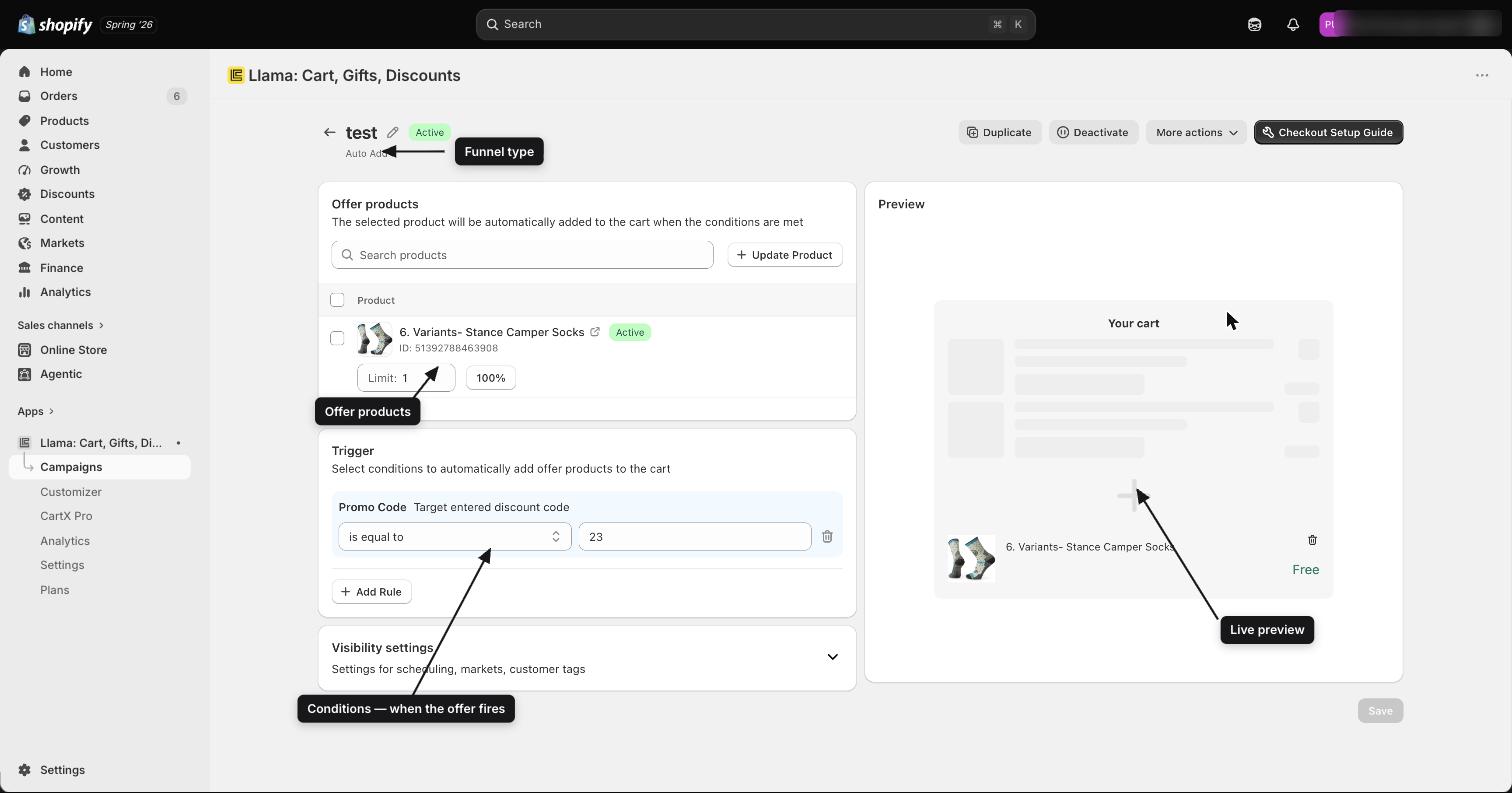
- One or more conditions — rules that decide when a shopper sees the offer.
- An offer — the product or products you want to suggest.
When a shopper's cart matches your conditions, the campaign's offer surfaces in the right place.
Funnel types
Each campaign belongs to one funnel type that controls where the offer shows up:
| Funnel | Where the offer shows |
|---|---|
| Pre-purchase (Product Recommendations) | Embedded in your storefront theme — on the cart page, product page, or anywhere you place the widget |
| Auto-Add | Silently adds a product to the customer's cart when their cart matches your rules |
| Gift with Purchase | Shows a gift picker that unlocks when the cart reaches a spending threshold |
| Checkout Upsells | Appears inside the Shopify checkout page |
| Post-Purchase | Appears immediately after checkout, before the thank-you page |
| Content Unlock | A storefront widget that tracks cart progress toward a threshold and reveals a product offer when unlocked |
Conditions
To control when an offer fires, you attach conditions to a campaign. A condition is a set of rules built from cart data — product tags, subtotal amounts, UTM parameters, customer tags, applied discount codes, and more. You combine rules with AND/OR logic, and when a condition matches, the offer appears.
Discounts
Discounts are an optional way to sweeten any campaign. When a shopper adds an offered product to their cart, an automatic Shopify discount applies to that product at checkout — no coupon code required.
You can also run two standalone discount types:
- Volume / tier discounts — buy more, save more.
- Shipping discounts — free or reduced shipping when conditions are met.
You can run an upsell without a discount. Discounts simply make the offer more tempting.
Cart restrictions and product limiters
Alongside campaigns, the app gives you rule systems that apply to every shopper, regardless of which campaigns are active.
- Cart Restrictions — enforce rules on the cart, such as blocking checkout when the order total is below a minimum or when specific product combinations occur. Shoppers see a configurable message.
- Product Limiters — cap how many of a specific product or variant a shopper can add to the cart. The limit is enforced quietly at checkout with a message you choose.
Llama Cart
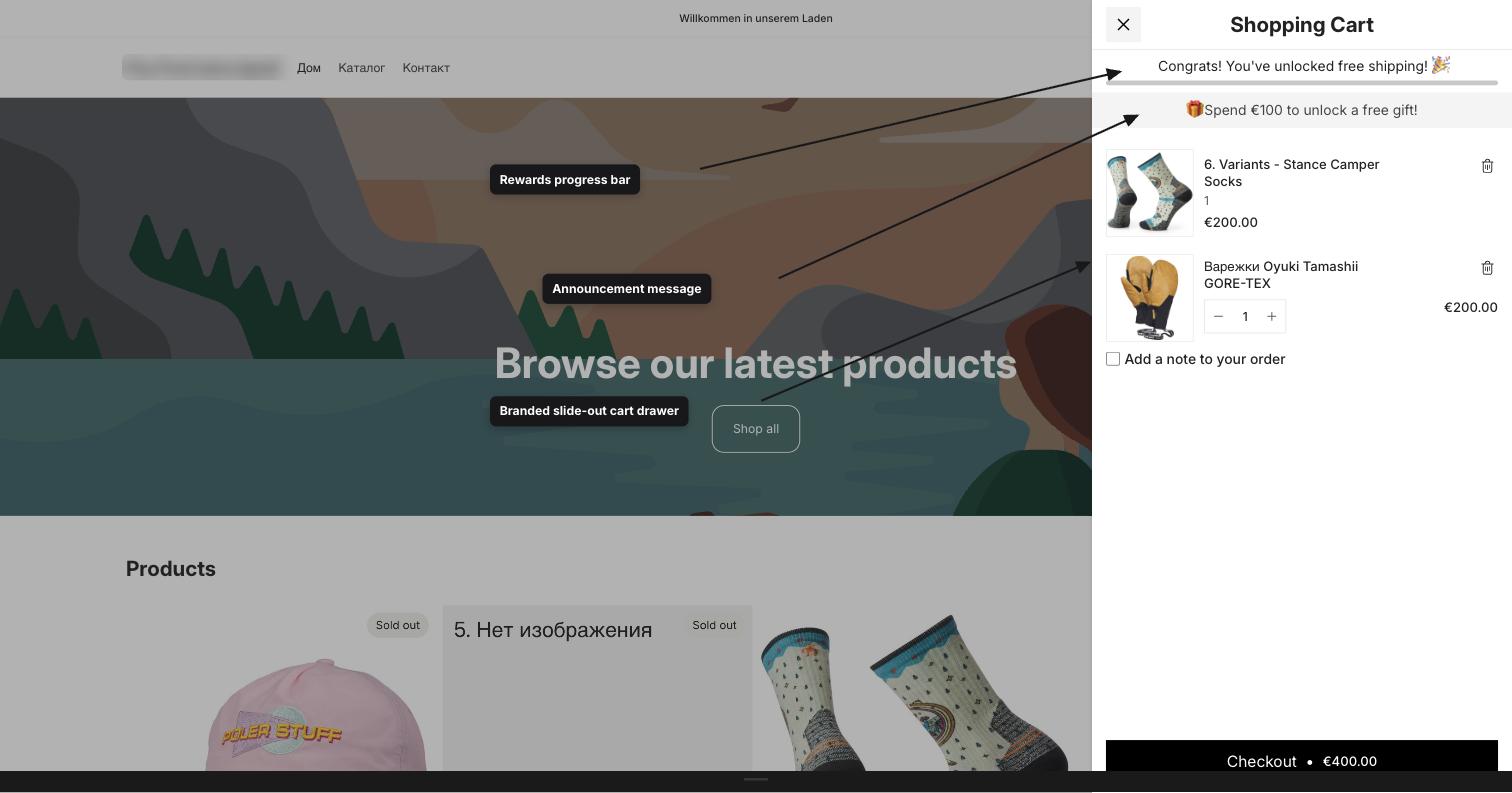
Llama Cart is a slide-out cart drawer that replaces the default Shopify cart experience. Through a visual customizer, you can:
- Embed campaign offer widgets directly inside the drawer.
- Add custom content blocks.
- Configure rewards progress bars, discount code entry, and announcement text.
You can set up to three independent A/B test versions of the drawer and choose which one is live at any time. Llama Cart works on its own too — the drawer, rewards, and custom blocks run even if you have no campaigns configured.
Storefront widgets
For campaigns that show offers outside the cart — product recommendations, Gift with Purchase, Checkout upsells, and Post-purchase offers — the app renders widgets through a Shopify theme app extension. Each widget has its own customizer for layout, colors, text, and button behavior.
These widgets run inside your theme without slowing it down: each one is isolated so your theme's styling never interferes with it. Checkout rules run entirely on Shopify's own infrastructure, so they're fast and can't be tampered with by customers.
Analytics
The Analytics page shows how much revenue your campaigns generate. It tracks every order that includes a product sold through one of your offers and breaks the results into three headline metrics:
- Total sales — revenue from products sold through your campaigns, in the selected currency and date range.
- Total sold offers — how many offered products shoppers actually purchased.
- Profit conversion — total sales as a percentage of the combined subtotal of all tracked orders.
A sales chart plots your results over time, and an orders list shows every tracked order with a link straight to it in your Shopify admin. You can filter by date range, currency, funnel, and individual campaign.
Only orders that contain at least one campaign product appear in Analytics, so every figure you see is revenue your campaigns directly contributed to.
How to think about the app
- Campaigns control when and what to offer. Set conditions to match the right cart state, then point to the right products.
- Discounts are optional add-ons to campaigns. You can run an upsell without one.
- Restrictions and limiters are independent. They apply to every shopper, regardless of which campaigns are active.
- Llama Cart is your storefront shell. It hosts campaign widgets but also works on its own.
- Your plan controls how many of each you can have active. The Free plan allows one active campaign, one restriction, and one product limiter. Paid plans raise these limits.
Next steps
Ready to get going? Install the app and turn it on in your store.