
Llama Cart for developers
How the Llama Cart smart cart loads, stays in sync via a fetch override, opens programmatically, and runs in preview mode.
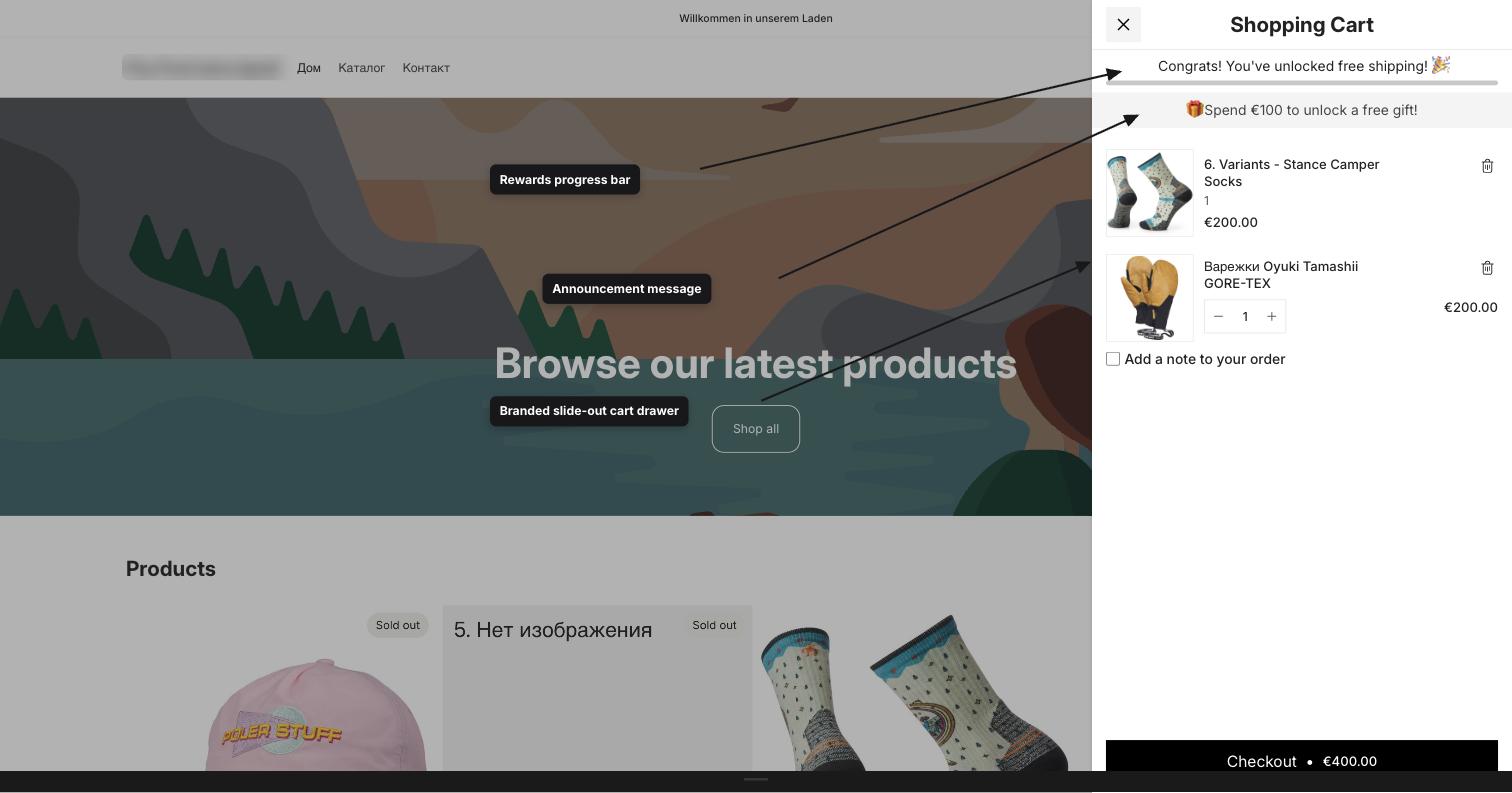
Llama Cart is the smart cart drawer that replaces your theme's default cart drawer. This page explains how it loads on the storefront, how it keeps itself in sync with cart changes by overriding fetch and XMLHttpRequest, and how to open it or run it in preview mode using query parameters and events.
If you only need the events the cart emits, jump straight to Cart events.
How Llama Cart loads
Llama Cart ships as part of the theme app extension. When the app embed is active, a loader script runs on every storefront page and decides whether to render the smart cart.
The cart renders only when both of these are true:
- The block's version setting is not
disabled(theoriginalLlamaCartVersionvalue). - Llama Cart is enabled — either globally (
globalSettings.llamaCartEnabled) or through an active preview session.
When those conditions are met, the loader does two things:
Hide the theme's native cart
It injects a <style> tag that hides the host theme's default cart elements so they don't appear alongside Llama Cart:
cart-drawer,
cart-notification,
cart-drawer-component > dialog {
  display: none !important;
}
Load the cart bundle
It appends a deferred <script> that loads the lcuSmartCart.js asset. This bundle reads the app embed data and renders the cart.
The rendered drawer lives in a container with the id lcu-llama-cart and is mounted onto document.body. The embed data the bundle reads is a JSON payload in the #upsell-app-embed-data element, which includes the cart, the customer, drawer settings, active campaigns, and translatable content.
The drawer markup is present in the DOM as soon as the page loads, but it stays off-screen (translated out of view) until you open it. Opening and closing is driven entirely by the toggle event described below.
Staying in sync: the fetch override
The host theme, its sections, and other apps all modify the cart by calling the Shopify Cart AJAX API (/cart/add, /cart/change, /cart/update, and so on). Llama Cart needs to know whenever that happens so its contents stay accurate. It does this by wrapping the browser's native window.fetch and XMLHttpRequest.prototype.open.
What gets intercepted
The override stores references to the native functions first, then installs its wrappers. Only cart-modifying requests are intercepted — everything else passes straight through to the native implementation untouched. A request is treated as a cart modification when:
- The URL contains
/cart, and - The request method is
POST.
For any request that isn't a cart POST, the wrapper calls the native fetch directly and returns. This keeps the override invisible to the rest of the page.
What happens on a cart change
For an intercepted cart POST, the wrapper awaits the real request, clones the response, and — if the response is ok — parses the cart JSON. It then:
Emits item-level events
It inspects the URL and response to figure out what changed, then dispatches add/remove events. See Cart events for the full payloads.
Opens the cart on "add"
If the URL is an /add request and the shopper is not already on the /cart page, the override opens the drawer by dispatching the toggle event (covered below).
Refreshes cart state
For /add requests (or any response that doesn't already include an items array), it re-fetches the full cart from cart.js to get the complete, current state. Otherwise it uses the response body directly. Either way, the resulting cart is handed to a debounced update handler.
The cart re-fetch uses the native fetch with Cache-Control: no-cache against {root}cart.js, where {root} comes from window.Shopify.routes.root. Using the native function here is deliberate — it avoids re-entering the override and causing an infinite loop.
The two-stage update
The update handler is debounced (100 ms) and dispatches cart-updated events in two stages:
- It dispatches
upsell:cart-updatedsynchronously with the new Shopify cart. - If the cart has a valid token and items, it then fetches the matching Storefront API cart and dispatches
upsell:storefront-cart-updatedonce that resolves.
The storefront fetch is what powers bundle line components inside the cart. It calls the Storefront GraphQL API using the access token exposed on window[APP_HANDLE].storefrontAccessToken.accessToken, and it fails silently — a missing token, network error, or rate limit must never break the host theme.
The XMLHttpRequest path mirrors the fetch path for older themes and apps that still use XHR for cart requests. The same rules apply: only POST requests whose URL contains /cart are intercepted, and the same events fire.
Idempotent installation
The override guards against being installed twice. It namespaces everything under window[APP_HANDLE] and sets window[APP_HANDLE].isFetchOverwritten = true once installed. If the script runs again and finds that flag, it logs Fetch already overridden and returns without re-wrapping.
APP_HANDLE and APP_NAME come from the app's global settings (appHandle and appName). The cart reads and writes its runtime state on the window[APP_HANDLE] object, so avoid touching that namespace from your own theme code.
Opening the cart
There are three supported ways to open Llama Cart.
Dispatch the toggle event on document. This is the canonical, framework-agnostic way to control the drawer:
// Open the cart
document.dispatchEvent(
  new CustomEvent('lcu:cart:toggle', { detail: { open: true } })
);

// Close the cart
document.dispatchEvent(
  new CustomEvent('lcu:cart:toggle', { detail: { open: false } })
);
The event name is lcu:cart:toggle. The detail.open boolean sets the desired state. Omitting detail.open toggles the current state.
Llama Cart listens for clicks on common cart triggers in the capture phase. If a shopper clicks an element matching one of these selectors, the default navigation is prevented and the drawer opens instead:
[
  '[data-lcu-smart-cart-trigger]',
  'cart-icon[data-testid="cart-icon"]',
  'header a[href="{root}cart"]',
  'header a[href="/cart"]',
  'header a[href="cart"]',
  'nav a[href="{root}cart"]',
  'nav a[href="/cart"]',
  'nav a[href="cart"]',
]
To make any custom element a cart opener, add the data-lcu-smart-cart-trigger attribute to it:
<button data-lcu-smart-cart-trigger>View cart</button>Pressing Enter while a cart-icon[data-testid="cart-icon"] element is focused also opens the cart, for keyboard accessibility.
Add the showLlamaCart query parameter to a URL to request the cart open after the page loads:
https://your-store.com/products/example?showLlamaCart=1The parameter name is showLlamaCart and the value that opens the cart is 1. This is useful for deep links — for example, a "return to cart" link in an email.
Preview mode
Preview mode lets you load Llama Cart on a storefront even when it isn't enabled globally, and lets you preview specific design versions. It's driven entirely by query parameters, and each preview selection is stored in sessionStorage with a 10-minute expiry so it survives navigation within the same tab.
Enable or disable the preview
Use llama-cart-preview-mode to force the cart on or off for your session:
| Parameter | Value | Effect |
|---|---|---|
llama-cart-preview-mode | 1 | Enables Llama Cart for this session (stored for 10 minutes). |
llama-cart-preview-mode | 0 | Disables preview mode by clearing the stored flag. |
https://your-store.com/?llama-cart-preview-mode=1When preview mode is active, the cart loads even if globalSettings.llamaCartEnabled is false — as long as the block version is not set to disabled.
Preview a specific version
Use llama-cart-preview-target to preview one of the cart's design versions. The target value maps to an internal version:
| Target value | Version previewed |
|---|---|
a | Customization |
b | Customization B |
c | Customization C |
https://your-store.com/?llama-cart-preview-target=aWhen a valid target is set, the loader swaps in that version's drawer settings and translatable content before the cart renders. An unrecognized target value clears any stored target.
Preview a specific market
Pair the target with llama-cart-market-id to preview the version as configured for a specific market. When omitted, the market id defaults to main:
https://your-store.com/?llama-cart-preview-target=a&llama-cart-market-id=mainLike the other preview values, the target and market selection are stored in sessionStorage for 10 minutes. To clear a preview immediately, load any page with llama-cart-preview-mode=0.
Constant reference
These are the exact constants Llama Cart uses. Treat the event names and query-parameter keys as a stable contract; the internal storage keys are listed for completeness.
Query parameters
| Constant | Value |
|---|---|
LLAMA_CART_OPEN_QUERY_PARAM | showLlamaCart |
LLAMA_CART_OPEN_QUERY_VALUE | 1 |
LLAMA_CART_PREVIEW_MODE_QUERY_PARAM | llama-cart-preview-mode |
LLAMA_CART_PREVIEW_MODE_QUERY_VALUE | 1 |
LLAMA_CART_PREVIEW_TARGET_QUERY_PARAM | llama-cart-preview-target |
LLAMA_CART_PREVIEW_MARKET_ID | llama-cart-market-id |
Events
| Constant | Value |
|---|---|
LLAMA_CART_TOGGLE | lcu:cart:toggle |
CART_UPDATED | upsell:cart-updated |
STOREFRONT_CART_UPDATED | upsell:storefront-cart-updated |
ITEMS_ADDED_TO_CART | lcu:cart:item_added |
ITEMS_REMOVED_FROM_CART | lcu:cart:item_removed |
DOM and storage keys
| Key | Value |
|---|---|
| Drawer container id | lcu-llama-cart |
| Embed data element id | upsell-app-embed-data |
| Open-state class | lcu_open |
| Preview-mode storage key | llama-cart-preview-mode |
| Preview-target storage key | llama-cart-preview-target |
| Preview TTL | 10 minutes |
Frequently asked
Next steps
Metafields (lc_upsell)
Reference for the lc_upsell metafield namespace, its minified dsm/csm structure, how the product-discount Function reads it, and the full list of app metafield namespaces and keys.
Extensions
The eight Shopify Function and checkout UI extensions that power pricing, checkout blocking, quantity limits, and post-purchase offers.