
Translating content
Translate storefront-facing Llama Upsells text — Llama Cart and widget content — into any language using Shopify's Translate & Adapt app.
Storefront-facing Llama Upsells text — the labels and messages shoppers see in the Llama Cart and in your Online Store widgets — is translated with Shopify's Translate & Adapt app. The translatable strings are exposed as store metafields holding JSON, so you copy each metafield's content, translate the values, and paste the result under the target language.
Just want the step-by-step? If you only need to localize your text — including the per-market decision of whether to Translate Across Markets or Adapt for a specific Market — follow the merchant walkthrough at Translate widget & cart text per locale and market. This developer page is the complete variable dictionary: it lists every translatable key, explains the JSON structure you'll see in each metafield, and documents the edge cases (nested conditions, rich-text blocks, and multiple versions/markets in one payload) that the workflow guide doesn't go into.
How translation works
The Llama Upsells theme app extension renders its UI text from a default English locale that ships with the extension. To present that text in another language, you don't edit the app — you translate the storefront strings through Shopify's translation layer.
Llama Upsells surfaces two metafields under Store metadata in Translate & Adapt:
| Metafield | Translates |
|---|---|
llama-translatable-cart.content | Llama Cart content |
llama-translatable-campaigns.active | Online Store widget content |
Both metafields store their content as JSON. Each translatable string lives under a named key (for example, cartTitle or buttonAddToCartText), and you translate the value while leaving the key untouched.
The theme app extension ships with a default English (en.default) locale. The Llama Cart subscription labels — Pay Full Price, One-time only, and Subscribe — come from this default locale. The Llama Cart and widget content described on this page is translated through the metafields below.
Prerequisites
Install Translate & Adapt
Install the Translate & Adapt app from the Shopify App Store.
Add your languages
In Translate & Adapt, add the languages you want to translate into so they're available to start translating.
Translate Llama Upsells content
Open Translate & Adapt and choose a language to translate.
Choose a language
Under Localized content, choose a language — for example, French.
Open Store metadata
Go to the Store metadata section.
Pick a translation scope
Choose whether to Translate Across Markets or Adapt for a specific Market. You can set up either approach depending on your needs.
Find the Llama metafields
Locate the metafields you want to translate:
llama-translatable-cart.content— for the Llama Cartllama-translatable-campaigns.active— for Online Store widgets
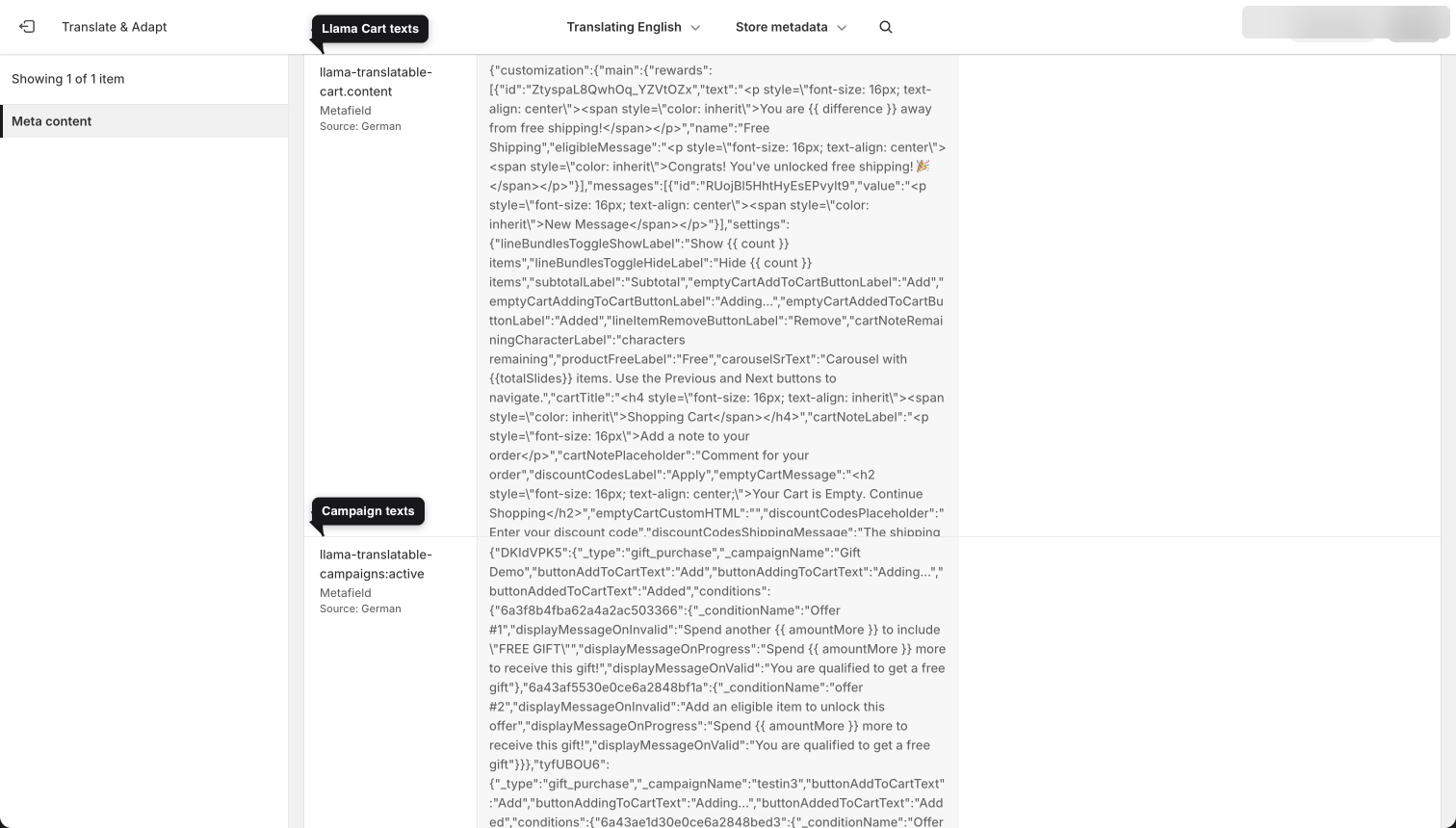
Translate the JSON content
The accepted format for translation is JSON. To translate a metafield:
Copy the source content
Copy the content of the llama-translatable-cart.content or llama-translatable-campaigns.active metafield.
Translate the values
Translate the content into your target language. Use the variable keys (listed below) to identify which text each value controls — for example, cartNotePlaceholder, discountCodesLabel, or productFreeLabel. Translate only the values; leave the keys as they are.
Paste under the target language
Insert the translated content into the region under the language you're translating into.
Keep the JSON structure and all keys exactly as they appear in the source. Translate only the string values. Changing or removing a key can break how the content renders on the storefront.
Llama Cart variables
These keys live in llama-translatable-cart.content. Each one maps to a specific piece of Llama Cart text. The arrow (→) shows the default English value.
Rewards and messages
| Variable | Description |
|---|---|
eligibleMessage | Rewards message → "Congrats! You've unlocked free shipping!" |
message.value | Custom message text |
Cart lines and labels
| Variable | Description |
|---|---|
cartTitle | Title of the cart → "Shopping Cart" |
cartNoteLabel | Cart note label → "Add a note to your order" |
cartNotePlaceholder | Cart note placeholder text → "Comment for your order" |
cartNoteRemainingCharacterLabel | Cart note character-limit message → "characters remaining" |
emptyCartMessage | Empty cart message → "Your cart is empty. Start shopping…" |
emptyCartCustomHTML | Custom HTML element for the empty cart |
subtotalLabel | Price subtotal label → "Subtotal" |
lineItemRemoveButtonLabel | Remove-a-product button label → "Remove" |
productFreeLabel | Label for an applied discount code → "Free" |
collectionBtnLabel | Collection link button label → "Continue Shopping" |
lineBundlesToggleShowLabel | Show-items toggle message → Show {{ count }} items |
lineBundlesToggleHideLabel | Hide-items toggle message → Hide {{ count }} items |
Discount codes
| Variable | Description |
|---|---|
discountCodesTitle | Discount code title |
discountCodesLabel | Discount code button text → "Apply" |
discountCodesPlaceholder | Promo code placeholder text → "Enter your discount code" |
discountCodesToggleLabel | Discount input toggle title → "Have a promotional code?" |
discountCodesShippingMessage | Shipping-discount applied message → "The shipping discount code will be applied at the checkout" |
invalidDiscountCodeMessage | Invalid code message → "Enter a valid discount code" |
alreadyAppliedDiscountCodeMessage | Duplicate/already-applied code message → "Discount code is already applied" |
removableAtCheckoutDiscountCodeMessage | Removable-at-checkout message → "This discount code can be removed in checkout page" |
limitReachedDiscountCodeMessage | Usage-limit reached message → "Applied discount code has reached its usage limit." |
Buttons and actions
| Variable | Description |
|---|---|
checkoutButtonLabel | Checkout button text → "Checkout" |
viewCartButtonLabel | View cart button text → "View Cart" |
enableSubscriptionBtnContent | Subscription upsell message → "Upgrade to Subscription & Save" |
emptyCartAddToCartButtonLabel | Add-to-cart button label → "Add" |
emptyCartAddingToCartButtonLabel | Add-to-cart button label while adding → "Adding..." |
emptyCartAddedToCartButtonLabel | Add-to-cart button label after adding → "Added" |
Widget variables
These keys live in llama-translatable-campaigns.active and control the text in your Online Store widgets.
| Variable | Description |
|---|---|
mainTitle | Primary headline encouraging an order upgrade → "Upgrade Your Order!" |
mainDescription | Main descriptive text encouraging additional purchases → "Add this favorite to round off your selection." |
downsellTitle | Headline promoting savings via a downsell offer → "Save More on Your Order!" |
downsellDescription | Description for a discounted complementary offer → "Get this special deal to complement your order at a discounted price" |
title | General title field, often empty or contextual depending on use |
buttonAddToCartText | Add-an-item-to-cart button text → "Add" |
buttonAddedToCartText | Button text after an item is added to the cart → "Added" |
removeButtonText | Remove-an-item-from-cart button text → "Remove" |
buyButtonText | Finalize-purchase / add-upsell button text → "Buy" |
skipButtonText | Skip-an-optional-offer button text → "Skip" |
selectOptionsLabel | Label for the product variant selection dropdown → "Variants" |
quickViewLabel | Label for the quick product preview feature → "Quick view" |
displayMessageOnInvalid | Shown when a customer hasn't met the free-gift requirements → "Spend another to include "FREE GIFT"" |
displayMessageOnProgress | Indicates how much more to spend to receive the free gift → "Spend more to receive this gift!" |
displayMessageOnValid | Confirms the customer qualifies for the free gift → "You are qualified to get a free gift" |
timerMessage | Countdown for how much time is left on an offer → "Offer ends in {timer}" |
Some values contain placeholders such as {timer} or escaped quotes like \"FREE GIFT\". Keep these intact when translating — they're substituted at render time.
Gift-with-purchase messages live under a nested conditions object
The three gift-with-purchase progress strings — displayMessageOnProgress, displayMessageOnValid, and displayMessageOnInvalid — are not flat top-level keys in the JSON. For a gift-with-purchase widget they sit inside a conditions object, where each entry is keyed by the condition and holds its own copy of those three messages (plus a _conditionName label that helps you identify which spend/quantity rule it belongs to). The shape looks like this:
{
  "_type": "gift_purchase",
  "buttonAddToCartText": "Add",
  "conditions": {
    "<conditionKey>": {
      "_conditionName": "Spend over $50",
      "displayMessageOnProgress": "Spend more to receive this gift!",
      "displayMessageOnValid": "You are qualified to get a free gift",
      "displayMessageOnInvalid": "Spend another to include \"FREE GIFT\""
    }
  }
}
If a gift-with-purchase campaign has more than one condition, you'll see the same three message keys repeated under each condition key — translate every one. Don't try to hoist them to the top level or merge them: each condition renders its own progress, valid, and invalid message, and removing or flattening the per-condition object breaks the gift progress bar. The _conditionName and _type / _campaignName keys are read-only labels — leave them untranslated.
Rich-text, custom-HTML, and per-version/per-market data are aggregated into one metafield
Two more places hold translatable copy in the Llama Cart metafield, and both are arrays keyed by id rather than single named keys:
richTextBlocks[].text— the text of each rich-text block you've added to the cart, one array entry per block.customBlocks[].html— the raw HTML of each custom-HTML block, one array entry per block.
Because these are aggregated, a translator opening llama-translatable-cart.content may see several entries that look alike — they're distinguished only by their id. Translate the text / html value in each entry and leave every id exactly as it is so the translation maps back to the right block. The same pattern applies to the emptyCartCollections, messages, and rewards arrays, which are also keyed by id.
Per-version and per-market Llama Cart copy is aggregated into the same llama-translatable-cart.content metafield, so the JSON can contain multiple versions and multiple markets at once. Translate the values in every block you see — skipping one leaves that version or market in English. Never deduplicate or delete a block because it looks like a repeat of another: same-looking entries belong to different versions or markets and are kept apart by their keys.
Why the Llama Cart JSON contains multiple versions and markets
The Llama Cart metafield follows the ITranslatableLlamaCart shape: the top level is keyed by a version key (versionKey), and under each version sits a main block plus a marketBased array. So the structure is versionKey → main + marketBased[], where each marketBased entry carries its own id, the list of markets it applies to, and a full data block with the same fields as main.
| Level | Key | What it holds |
|---|---|---|
| 1 | <versionKey> | One published version of the Llama Cart |
| 2 | main | The default (non-market-specific) translatable content for that version |
| 2 | marketBased[] | Per-market overrides; each entry has id, markets, and a data block |
| 3 | data | The same translatable fields as main, applied only to the listed markets |
This is why a single metafield can expand into several near-identical blocks: every active version contributes a main block, and any market with its own adapted copy adds a marketBased entry. Knowing the shape tells you exactly how many blocks to expect — translate main for the default experience, and each marketBased[].data for the markets you adapt.
Next steps
Translate widget & cart text per locale and market
The merchant step-by-step, including the per-market Translate Across Markets vs Adapt for a specific Market choice.
Placing widgets
Add upsell widgets to any page or section of your Shopify store.
App blocks
Reference for every block, its settings, and embedding options.
Webhooks
How Llama Upsells uses Shopify webhooks — the mandatory GDPR compliance webhooks it handles, and how order webhooks feed Analytics.
Developer troubleshooting
Diagnose and fix common Llama Upsells integration problems — app embed, missing widgets, stale carts, native drawers, and Llama Cart sync.