
Llama Cart analytics
A new page shows how the Llama Cart itself performs: how often shoppers open it, how often they click checkout from it, and how many actually reach checkout.
Coming soon. This feature is not available in the app yet. It is being tested and will be released in a future update, so the screens below may still change.
A new page shows how the Llama Cart itself performs: how often shoppers open it, how often they click checkout from it, and how many actually reach checkout. You can look at all cart versions together or one version at a time.
Use it to see whether the cart helps shoppers move to checkout, and to compare cart versions you have published.
How to use
-
In the app, go to Customizer. This opens the Llama Cart page.
-
At the top right, click Analytics.
-
Pick a Date range: Last 7 days, Last 30 days (the default) or Month to date.
-
Pick a Cart version, or leave it on All versions.
-
Read the cards. The small text next to the filters shows which period you are comparing against.
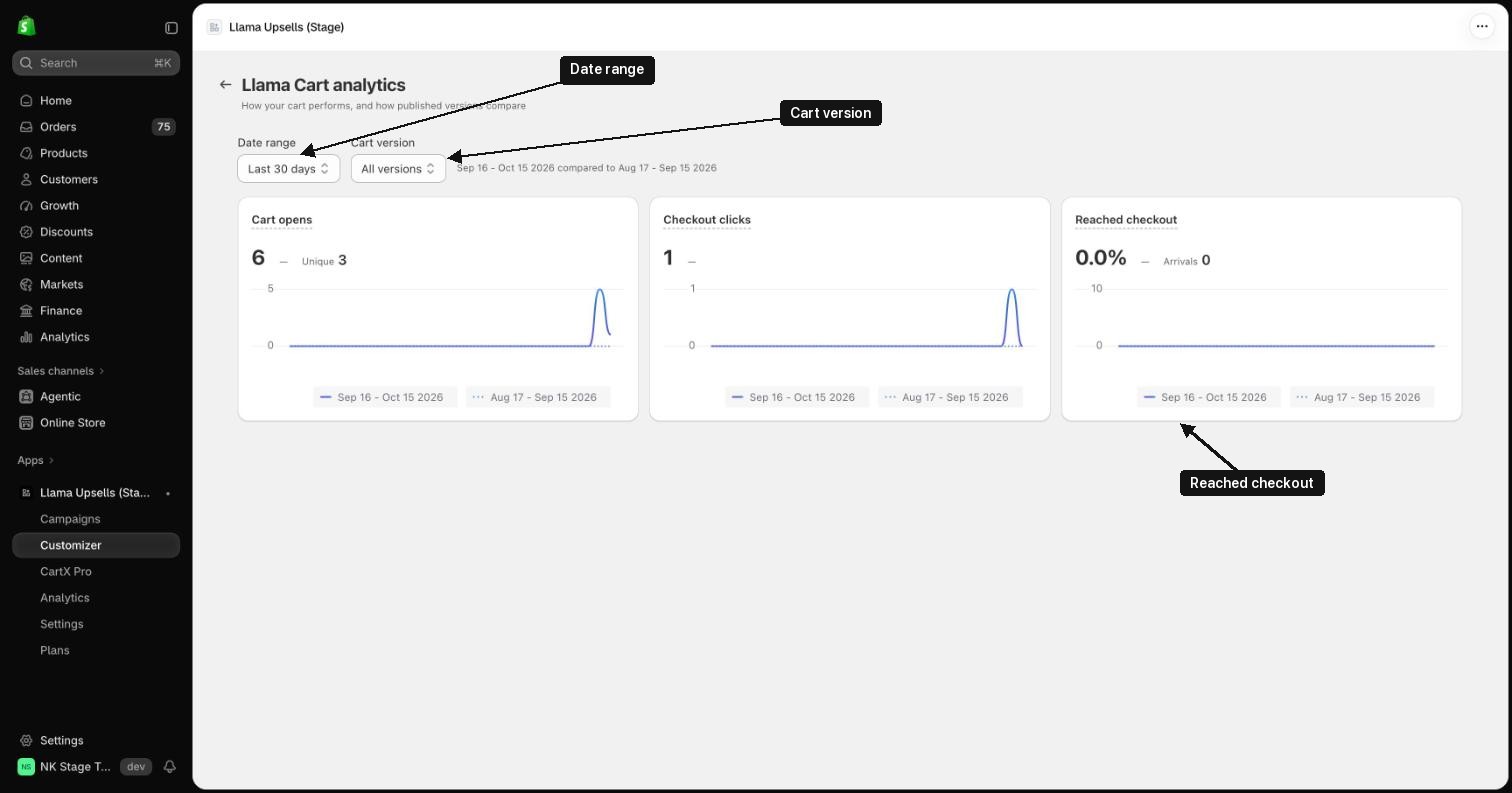
What each card shows
- Cart opens: how many times shoppers opened the Llama Cart. Unique counts each visitor once per day.
- Checkout clicks: clicks on the checkout button or an express payment button (such as Shop Pay or PayPal) inside the cart. This counts the click, not that the shopper reached checkout.
- Reached checkout: checkouts started on your store, divided by cart opens. Arrivals is the count.
The Cart · last 7 days card on the Llama Cart page shows cart opens for the last 7 days (all versions) and Open → checkout: checkout clicks divided by cart opens. This is not the same as Reached checkout.
What you might see
- No cart data yet. The app hasn't recorded any activity on your store yet. Numbers appear once shoppers start opening the cart. A period with no cart opens shows zeros instead.
- Analytics is unavailable in your plan. The store is on the Free plan. Click Upgrade now to change plan.
Good to know
- The page needs any paid plan. On the Free plan, it shows the Analytics is unavailable in your plan banner instead of the numbers.
- A cart open is counted only when the cart was closed before, so opening it twice in a row without closing counts once. This includes the cart opening by itself after a product is added.
- Cart version lists the versions that shoppers were shown in the period. A version deleted since then shows by its id.
- Reached checkout is measured on the checkout page and counts every checkout started on your store, including ones that did not come from the cart (for example Buy it now). It can be lower or higher than Checkout clicks. When you filter by a version, checkouts are counted against the version that was published at the time.
- Shoppers who turn off analytics cookies are not counted.
- Today is included; reload the page to see the latest numbers. Days are counted in UTC.