
App embed
The global app embed that loads the shared runtime and the Llama Cart on every storefront page.
The app embed is the single, store-wide block that bootstraps Llama Upsells on your storefront. Unlike the app blocks you place in specific sections, the app embed is enabled once from the theme editor and runs on every page, loading the shared runtime that every widget and the Llama Cart depend on.
What it loads
When enabled, the app embed (rendered from app-embed.liquid, target head) does the
following on each page load:
- Serializes storefront data into a JSON island. It writes a
<script id="upsell-app-embed-data" type="application/json">tag containing the current cart, customer (city, tags, market ID, email), main currency, enabled payment types, discounts map, drawer settings, global styles, global settings, active campaigns, campaign customizations, subscription status, translatable cart and campaign content, and whether design mode is active. The runtime reads this island instead of making extra requests for data the theme already has. - Loads the shared runtime. The block's
{% schema %}declares"javascript": "lcuAppEmbed.js", so Shopify injects the app embed runtime in the pagehead. - Sets up the global price formatter. It defines
window.getDisplayPrice(price), which formats a number using the shop's locale, active currency, and thepriceDigitalScalesetting (fixed_2rounds to two decimals;dynamicallows zero minimum fraction digits). - Exposes the app namespace. It initializes
window[appHandle]and attachesappSettingsand thestorefrontAccessTokenso widgets can read shared configuration. If global settings are missing, it falls back to a default object withappName"Llama Upsells",appHandle"lca_regal_upsells",priceDigitalScale"fixed_2", andllamaCartEnabledfalse. - Renders the fetch override via
override-fetch, so cart mutations on the page are intercepted and kept in sync. - Conditionally loads the Quick View library. If any widget in the active cart
configuration enables quick view (
enableQuickVieworproductClickActionset toquick_view), it injectslcuQuickViewModal.js. - Loads the Llama Cart. It renders the
llama-cart-scriptandllama-cartsnippets, which together inject the smart cart and wire up its triggers (see Llama Cart below).
The app embed only emits data and loads scripts — it renders no visible UI of its own beyond the Llama Cart drawer. The widgets you see on the page come from the individual app blocks.
Enabling the app embed
The app embed must be turned on in the theme editor before any Llama Upsells widget or the Llama Cart will work.
Open the theme editor
From your Shopify admin, go to Online Store → Themes, then click Customize on your live theme.
Open app embeds
In the left sidebar, open the App embeds panel (the puzzle-piece / theme settings area).
Toggle on the app embed
Find the Llama Upsells app embed and switch it on. Adjust its setting if needed (see Settings), then Save.
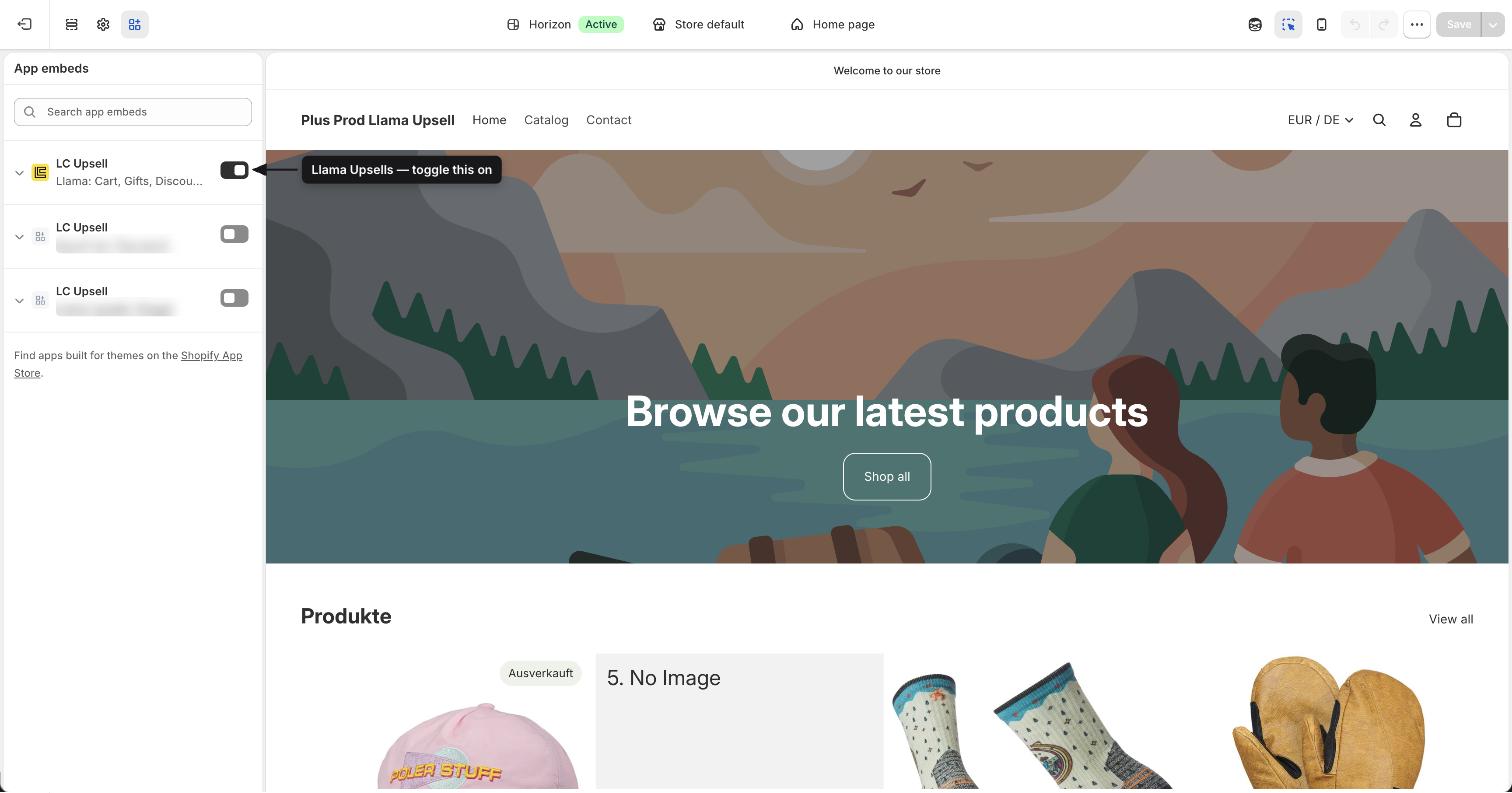
The app embed is global. If you disable it, the shared runtime no longer loads and every Llama Upsells widget — plus the Llama Cart — stops rendering, regardless of the individual app blocks you've placed.
Settings
The app embed exposes a single setting in its {% schema %}.
| Setting | ID | Type | Default | Description |
|---|---|---|---|---|
| Cart Experience Variant | smartCartCustomizationKey | select | published | Selects which cart design the app embed loads. Use the test variants to A/B test conversions, or disable the Llama Cart entirely. |
The select accepts the following options:
| Label | Value | What it does |
|---|---|---|
| Published | published | Loads the live, published cart configuration. The published version resolves to the variant named by your publishedLlamaCartVersion global setting (one of customization, customization-b, or customization-c), falling back to customization if none matches. |
| Test Version - A | customization | Loads the A test cart configuration. |
| Test Version - B | customization-b | Loads the B test cart configuration. |
| Test Version - C | customization-c | Loads the C test cart configuration. |
| Disable Llama Cart | disabled | Turns off the Llama Cart for this theme. The drawer is not shown and its triggers are not attached, regardless of whether the cart is enabled globally or via preview mode. |
If the variant you select has been deleted (its metafield is blank), the app embed
automatically falls back to published so the cart keeps working.
The block's schema, for reference:
{% schema %}
{
  "name": "LC Upsell",
  "target": "head",
  "javascript": "lcuAppEmbed.js",
  "settings": [
    {
      "type": "select",
      "id": "smartCartCustomizationKey",
      "label": "Cart Experience Variant",
      "default": "published",
      "options": [
        { "label": "Published", "value": "published" },
        { "label": "Test Version - A", "value": "customization" },
        { "label": "Test Version - B", "value": "customization-b" },
        { "label": "Test Version - C", "value": "customization-c" },
        { "label": "Disable Llama Cart", "value": "disabled" }
      ],
      "info": "Select which cart design to display. Use test variants to A/B test conversions."
    }
  ]
}
{% endschema %}
The embed data island
The runtime hydrates from a single JSON script tag rather than re-fetching data the theme already exposes. You can read it for debugging:
const data = JSON.parse(
  document.getElementById('upsell-app-embed-data').textContent
);

console.log(data.smartCartVersion);   // resolved cart variant key
console.log(data.llamaCartEnabled);   // whether the Llama Cart is on
console.log(data.shopifyCart);        // the current cart object
Notable fields on the island include shopifyCart, shopifyCustomer, mainCurrency,
enabledPayments, discountsMap, drawerSettings, globalStyles, globalSettings,
campaignCustomizations, activeCampaigns, isDesignMode, smartCartVersion,
subscriptionStatus, translatableCartContent, translatableCampaignsContent,
llamaCartEnabled, and checkoutSettings.
How the Llama Cart loads
The app embed decides whether to render the Llama Cart drawer using two inputs: the global
llamaCartEnabled setting and an optional preview session. The drawer loads only when the
selected variant is not disabled and the cart is enabled globally or a preview
session is active:
if (originalLlamaCartVersion !== 'disabled') {
  const shouldShowLlamaCart = llamaCartEnabled || llamaCartPreviewSession === '1';
  // when true: hide the theme's native cart, load lcuSmartCart.js
}
When the cart should show, the embed:
- Hides the theme's native cart by injecting a style that sets
display: noneoncart-drawer,cart-notification, andcart-drawer-component > dialog. - Loads
lcuSmartCart.js(deferred) to render the drawer. - Mounts the drawer markup (
#lcu-llama-cart) and attaches its triggers so that clicking the cart icon or any header/nav link to/cartopens the Llama Cart instead of navigating away.
Previewing a cart variant
The app embed supports two URL-driven preview modes, each stored in sessionStorage for
10 minutes:
| URL parameter | Effect |
|---|---|
llama-cart-preview-target=a (or b, c) | Previews a specific cart variant (a → customization, b → customization-b, c → customization-c) by overriding the embed data island's drawer settings and translatable content. Pair with llama-cart-market-id to preview a market-specific configuration. |
llama-cart-preview-mode=1 | Forces the Llama Cart to render even when it is disabled globally. Use llama-cart-preview-mode=0 to clear it. |
Preview state is per-session and expires automatically after 10 minutes, so it never affects what live shoppers see.