
Widget block
Developer reference for the Widget app block — its schema settings, placement, and how it binds to active campaigns.
The Widget block is a theme app extension block that renders an upsell or cross-sell widget on your storefront. It resolves a campaign, picks the correct widget script for that campaign's funnel and layout, and injects the widget into the page.
Purpose
The block is responsible for putting a campaign's widget on a storefront page. At render time it:
- Resolves which campaign (widget) to display — either an explicitly configured
widgetIdor an active campaign chosen automatically. - Loads the layout-specific script for that campaign's funnel (Gift with Purchase or Pre Purchase).
- Renders a sized placeholder element so the widget area is reserved while the script loads.
If no widget can be resolved, or the store's subscription has reached its limit, the block renders nothing.
Where it is placed
The block targets a section, so you add it through the theme editor as an app block inside any section that supports app blocks.
"target": "section"By default the block renders inline, exactly where it sits in the section. You can instead render it into a different element on the page using the Embed control settings described below.
The block registers in the theme editor under the name Widget. Add it from the section's "Add block" menu, then configure it in the block settings panel.
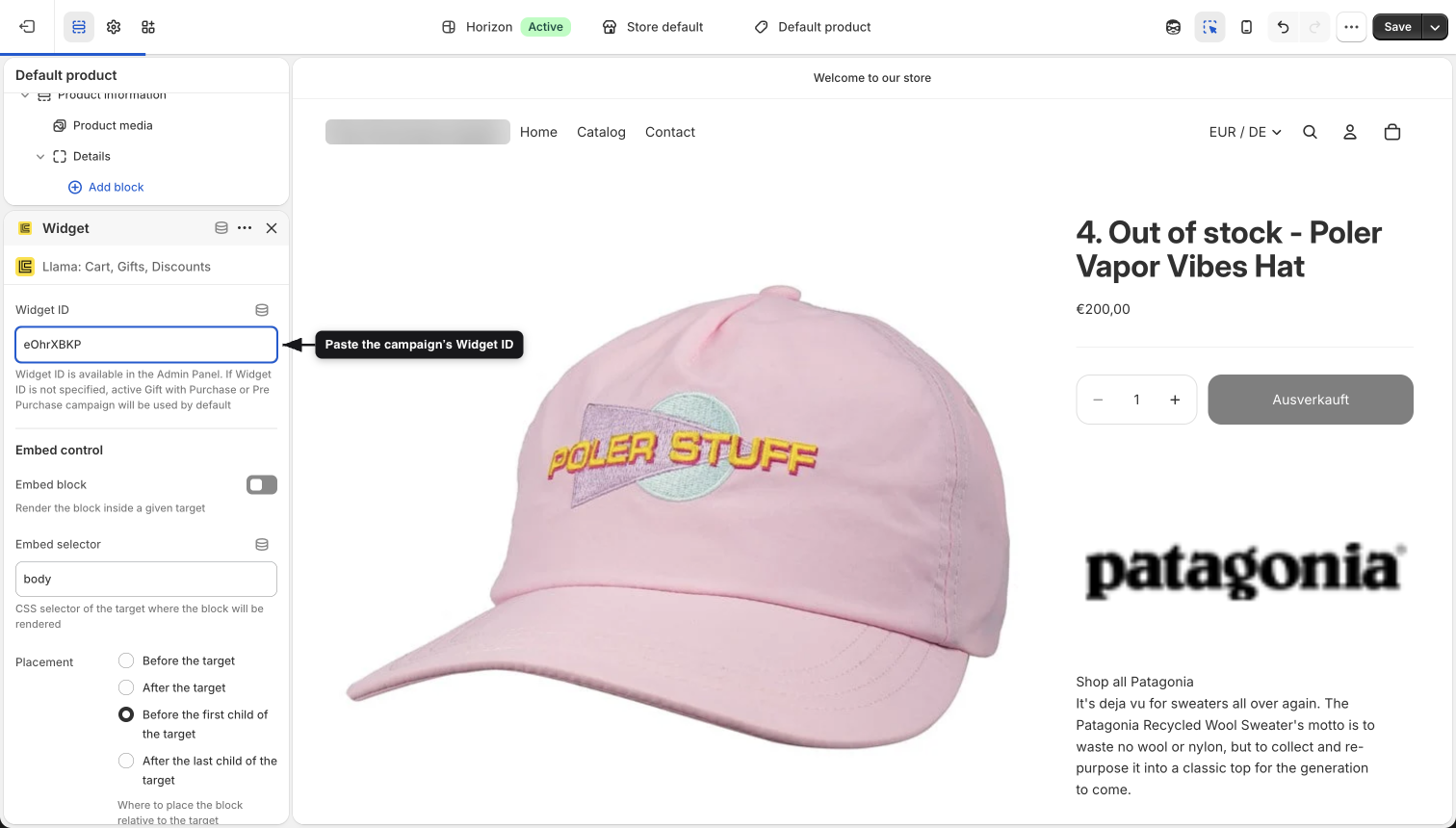
Schema settings
All settings live in the block's {% schema %}. The table below documents every setting, grouped as they appear in the editor.
| ID | Label | Type | Default | Description |
|---|---|---|---|---|
widgetId | Widget ID | text | — | The ID of the widget to render. Available in the Admin Panel. If left blank, the block falls back to an active Gift with Purchase or Pre Purchase campaign (see Campaign binding). |
| — | Embed control | header | — | Section header that groups the embed settings below. |
isEmbed | Embed block | checkbox | false | When enabled, the block renders inside a given target element instead of inline. |
embedSelector | Embed selector | text | body | CSS selector of the target element where the block is rendered when Embed block is enabled. |
where | Placement | radio | afterbegin | Where to place the block relative to the embed target. See the options below. |
Placement options
The where setting maps directly to the positions used by the browser's insertAdjacentElement API.
| Value | Label | Position relative to target |
|---|---|---|
beforebegin | Before the target | Immediately before the target element |
afterend | After the target | Immediately after the target element |
afterbegin | Before the first child of the target | Inside the target, before its first child |
beforeend | After the last child of the target | Inside the target, after its last child |
embedSelector and where only take effect when Embed block (isEmbed) is enabled. When isEmbed is false, the block renders inline at its position in the section.
Campaign binding
The block decides which widget to show in this order:
Explicit Widget ID
If widgetId is set, the block uses it directly.
{% if block.settings.widgetId != blank and block.settings.widgetId != empty %}
    {%- assign widgetId = block.settings.widgetId -%}
{% endif %}
Active campaign fallback
If widgetId is blank, the block reads the active campaigns from app.metafields.campaigns.active.value and iterates over them, skipping any whose status is not active. A gift_purchase campaign takes priority — the first active one wins. Otherwise, an active pre_purchase campaign is used.
Load campaign customizations
The resolved widgetId is used to look up that widget's customization settings from the campaigns metafield:
{%- assign settings = app.metafields.campaigns.customizations.value[widgetId] -%}These settings carry the campaign's funnel, layout, and styling used for the rest of the render.
Script selection
The script that gets injected depends on the campaign's funnel and layout:
For funnel == "gift_purchase":
layout | Script |
|---|---|
| (default / slider) | lcuGiftPurchaseSlider.js |
collapsible | lcuGiftPurchaseCollapsable.js |
listV2 | lcuGiftPurchaseListV2.js |
list | lcuGiftPurchaseList.js |
For funnel == "pre_purchase":
layout | Script |
|---|---|
| (default / slider) | lcuSlider.js |
list | lcuList.js |
scrollableList | lcuScrollableList.js |
The selected script is injected with inject-unique-lib, and the widget is initialized via the lib-loader snippet, which receives the block and the resolved settings.
Quick view
If the campaign's settings.enableQuickView is true, or settings.productClickAction == 'quick_view', the block additionally injects lcuQuickViewModal.js.
Placeholder elements
Before the widget script finishes loading, the block renders a sized placeholder so the layout does not shift. The placeholder class includes the block ID, so each block instance gets its own element:
<div class='lcu__slider__loader__{{ block.id }}'></div>The placeholder that gets rendered depends on the resolved layout:
| Layout / script | Placeholder class |
|---|---|
lcuGiftPurchaseSlider | lcu__gwp__slider__loader__{block.id} |
lcuGiftPurchaseListV2 | lcu__gwp__list__loader__{block.id} |
lcuSlider | lcu__slider__loader__{block.id} |
lcuList | lcu__list__loader__{block.id} |
lcuScrollableList | lcu__scrollable__list__loader__{block.id} |
An inline script hides each placeholder after one second by adding the lcu__loader__hidden class, which collapses its height and hides it:
setTimeout(() => {
  loaderElement.classList.add('lcu__loader__hidden');
}, 1000);
The placeholder background color and minimum height come from the campaign's settings (backgroundColor, slidesPerViewMobile) and, for Pre Purchase lists, from the campaign's offer count.
Render conditions
The block skips rendering the widget and its placeholders in these cases:
- Subscription limit reached. When
app.metafields.subscription.status.valuereportsreached, the widget script and placeholders are not rendered. - No script resolved. If no
funnel/layoutcombination matched, there is no script to load. - Embedded blocks. Placeholder elements are only rendered when Embed block (
isEmbed) isfalse.
Gift with Purchase collapsing
For Gift with Purchase, the placeholder is suppressed when the widget is configured to start collapsed:
{% if settings.enableCollapsibleContainer == true and settings.initialCollapseOpen == false %}
    {% assign isCollapsed = true %}
{% endif %}
Pre Purchase validity
Pre Purchase placeholders render only when the campaign is valid for the current cart. The block checks:
cart['attributes'][widgetId] == 'true'— the campaign was already validated against the cart, orapp.metafields.pre_purchase_campaigns.details.value[widgetId].alwaysValid— the campaign is always valid.
The Pre Purchase list placeholder height is derived from the offer count for the current variant group, read from app.metafields.pre_purchase_campaigns.details.value[widgetId].offersCount.