
Shipping discounts
Offer free or reduced-cost shipping that applies automatically at checkout when the cart meets your conditions.
Shipping discounts give your customers free or reduced-cost shipping the moment their cart meets your rules — a free-shipping threshold like "free shipping over $50" is the classic example. Like your other Llama Upsells discounts, they apply automatically at checkout, so customers never type a code.
How shipping discounts work
A shipping discount watches the cart and, when your conditions are met, reduces the cost of the qualifying delivery options at checkout. It runs through Shopify's own delivery system as an automatic discount, so the lower shipping price simply appears for the customer — no coupon code required.
There are two value types to choose from:
- Percentage — takes a share off the rate, like 50% off. Set it to 100 for free shipping, which zeroes the qualifying rate.
- Fixed — takes a flat figure off the rate, like $5 off.
A shipping discount only affects the shipping cost. To discount the products themselves, use offer discounts or tier discounts instead.
This page is the quick-start intro. For the full reference — targeting individual delivery methods with operators, the difference between fixed and percentage reductions, every trigger condition, scheduling, markets, and the combination toggles — see Shipping discounts: methods, conditions & combinations.
Set up a shipping discount
You build the conditions for a shipping discount the same way you build campaign rules — by subtotal, product matching, customer tags, and so on.
Choose the value type
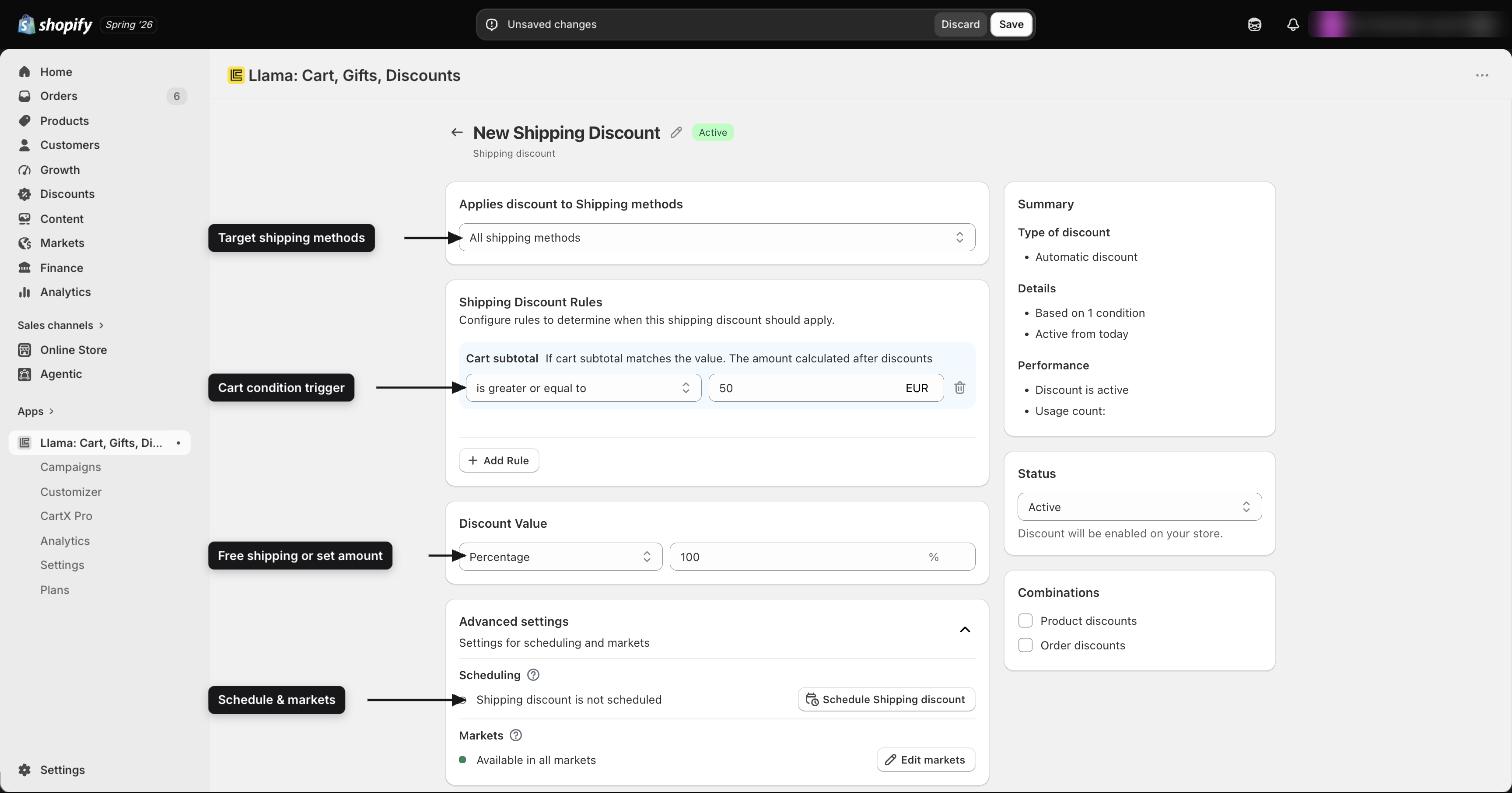
Set the discount value: choose Percentage to take a share off the rate, or Fixed to take a flat figure off it. For free shipping, use Percentage set to 100, which zeroes the rate.
Set the conditions that trigger it
Add the rules that the cart must meet for the discount to apply. To build a free-shipping threshold, set a minimum cart subtotal — for example, the discount applies once the subtotal reaches $50. You can also match on specific products and limit eligibility by customer tag.
Target where it applies
Narrow the discount to the shipping methods, Shopify markets, and date ranges you want. For example, you might offer free shipping only on standard delivery, only in a specific market, or only during a promotion window.
Shipping-method targeting works on the rate name shown at checkout. You choose an operator —
All methods, Contains, Equals, Does not contain, or Does not equal — and the
discount applies only to rates whose name matches. "All methods" applies to every delivery option;
the others let you target by name (for example, Equals Standard or Contains Express). See
the advanced reference for the full operator
behavior and conditions.
Save and go live
Save the discount. It starts applying automatically at checkout as soon as a cart meets your conditions.
How it applies at checkout
Because shipping discounts are Shopify automatic discounts, the customer doesn't need to do anything. When the cart qualifies and they reach checkout, the discount applies to the qualifying delivery options — taking your percentage or fixed amount off the rate (a percentage of 100 zeroes the rate for free shipping).
Combining with other discounts
A shipping discount carries its own combination settings, separate from Shopify's. Each one exposes two explicit toggles that decide whether it can stack alongside other discounts in the same cart:
| Toggle | Default | What it allows |
|---|---|---|
| Order discounts | Off | The shipping discount can apply at the same time as order-level discounts. |
| Product discounts | Off | The shipping discount can apply at the same time as product discounts. |
Both toggles start off, so a new shipping discount doesn't stack with order or product discounts until you turn the matching toggle on. (Tier discounts are the opposite — their combine toggles default to on.) These toggles are sent to Shopify with the discount, so they govern whether your shipping discount stacks with order and product discounts at checkout. Beyond these, shipping discounts still follow Shopify's standard combination rules for discount codes and other automatic discounts. The advanced reference covers exactly how these toggles behave with your other discounts.
For a full picture of how shipping discounts interact with campaigns, restrictions, and the cart, see How features interact.
Plan limits
Each subscription plan includes a set number of active shipping discounts:
| Plan | Shipping discounts |
|---|---|
| Free | 1 |
| Starter | 3 |
| Growth | 6 |
| Pro | 10 |
| Enterprise | 20 |
You can see your current usage on the subscription page. If you reach the limit, disable an existing shipping discount or upgrade your plan before creating a new one.
Where to go next
Shipping discounts: advanced
The full reference for method targeting, percentage vs fixed, conditions, and combinations.
Discounts overview
See every way to discount your offers and shipping.
Tier discounts
Reward bigger carts with volume-based pricing.
Offer discounts
Discount the products inside an upsell offer.
How features interact
See what overrides what when discounts and other features overlap.
Tier discounts: eligibility, exclusions & combinations
A field-by-field reference for tier discounts — automatic vs code, eligibility methods, the two exclusion toggles, conditions, and combinations.
Shipping discounts: methods, conditions & combinations
A deep reference for shipping-method targeting, percentage vs fixed shipping discounts, trigger conditions, scheduling, markets, and combinations.