
Discount value types explained
One reference for every discount value format — percentage and fixed amount — across offer, tier, and shipping discounts.
Llama Upsells has three discount surfaces — offer discounts, tier discounts, and shipping discounts — and each one exposes the same two value formats. That overlap is where most of the confusion comes from: is a percentage written with a % sign? Does a fixed amount come off once or per unit? Is "free shipping" a special toggle or just a discount value? This page is the single reference for every value format, what it means, and where you'll see it.
The value types at a glance
Across the whole app there are two underlying ways to express a discount value: a percentage and a fixed amount. The meaning is always the same.
| Value type | What you enter | What it means | Example | Where it appears |
|---|---|---|---|---|
| Percentage | A plain number, no % sign | A percentage off the price | 15 means 15% off | Offer, Tier, Shipping |
| Fixed amount | A currency amount | A flat amount off, applied per discounted unit | $10 off each unit | Offer, Tier, Shipping |
You never type a % sign for a percentage. Enter 15, not 15%. The app stores percentages as plain numbers and adds the % for the shopper at checkout.
The rest of this page walks through each surface in turn, then explains how values are stored and shown, and finishes with a recipe gallery you can copy.
Offer discounts (per product in a campaign offer)
Offer discounts attach to each product inside a campaign's offer. In the Automatic Discount modal on a product row, the two types you choose between are:
| Type | How it works | Example |
|---|---|---|
| Percentage | A percentage off the product | 20% off the offered product |
| Fixed amount | A flat currency amount off | $10 off the offered product |
How a fixed amount applies per unit
A Fixed amount offer discount applies per discounted unit, up to that variant's allowed quantity (default 1). It is not a once-per-line reduction: raise the variant's allowed quantity and the same fixed amount comes off each covered unit, so the total discount grows with the number of units discounted.
Here is a $10 fixed amount applied to an offered product whose allowed quantity is set to 3, so 3 units are covered:
| Value type | Calculation | Total off the line |
|---|---|---|
| Fixed amount ($10), allowed quantity 3 | $10 × 3 units | $30 |
| Fixed amount ($10), allowed quantity 1 (default) | $10 × 1 unit | $10 |
Fixed amount already scales with quantity — there is no separate "per-unit" value type. If you want the discount to cover more than one unit of an offered product (for example "$5 off every add-on"), raise that variant's allowed quantity; the fixed amount then comes off each covered unit. With the default allowed quantity of 1, only one unit is discounted. When in doubt, set the allowed quantity to 2 and confirm the discount doubles.
100% off = free
There is no separate "make it free" switch. A free product is simply a Percentage discount set to 100.
Open the product's discount settings
In the campaign's offer section, open the Discounts popover on the product row to open the Automatic Discount modal.
Choose Percentage and enter 100
Set the discount type to Percentage and enter 100. That takes 100% off the price, which leaves the product at zero.
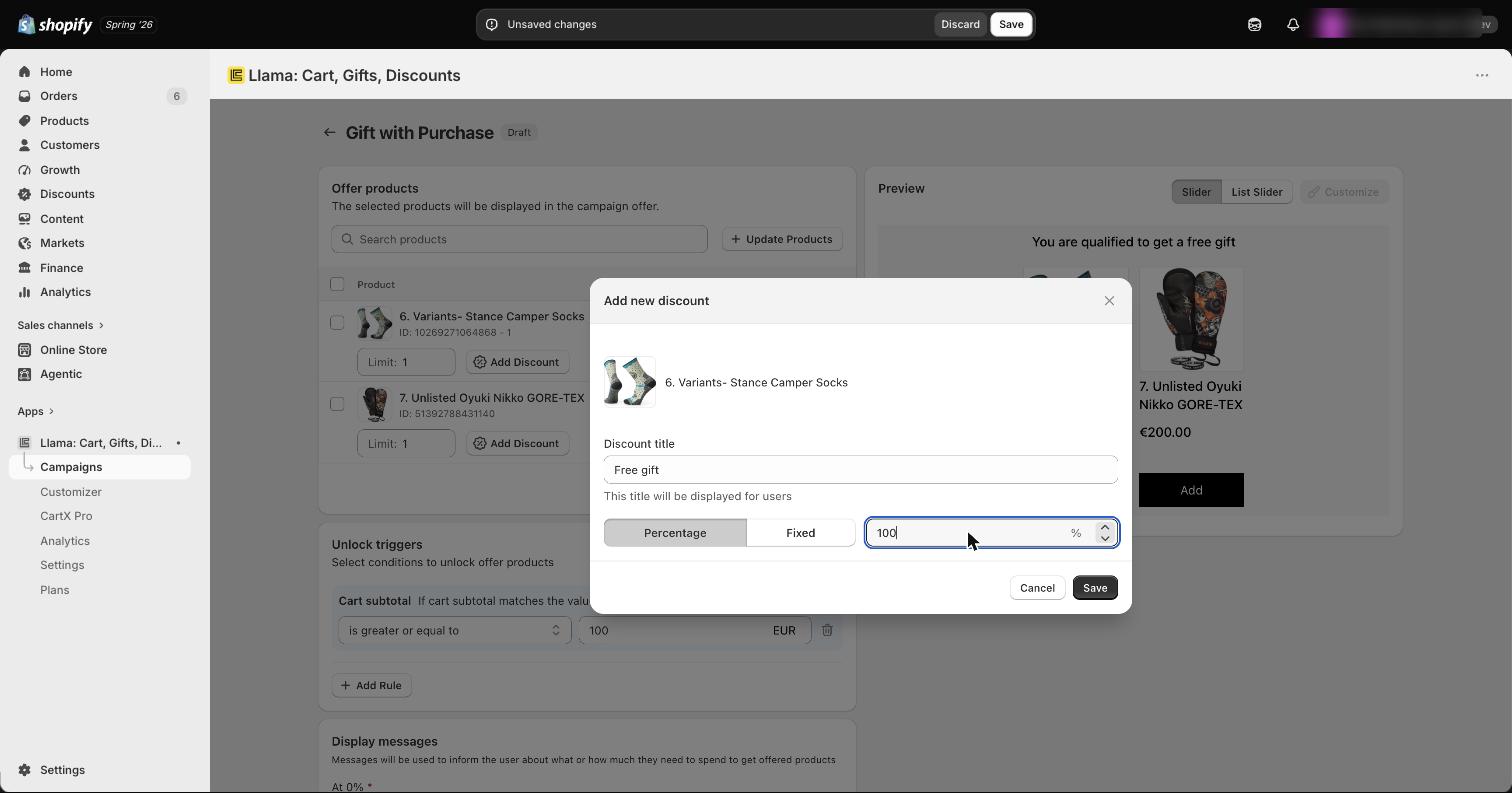
Save the campaign
Save the campaign. Once the conditions are met, the product applies at no cost.
This is exactly how a free gift is priced. A Gift with Purchase campaign offers its gift product with a 100% percentage discount, so the gift shows in the cart at zero. If you ever see a "free" gift charging the shopper, the first thing to check is that its discount is Percentage = 100, not a fixed amount equal to the price (a fixed amount won't stay at zero if the price changes).
Tier discounts
Tier (volume) discounts reward bigger carts. Each tier you build pairs a subtotal threshold with a discount value, and the value types are:
| Type | How it works | Example |
|---|---|---|
| Percentage | A percentage off the eligible products | 10% off |
| Fixed | A flat amount off the eligible products | $15 off |
A tier's value is applied to the eligible products chosen by the tier's product-eligibility method — all eligible products, the highest-priced items, or the lowest-priced items — not blindly to the whole cart. Which items those are is covered in the tier discounts deep-dive.
Fixed-amount tiers are stored per currency. When you set a fixed value, the app keeps a separate amount for each of your store's currencies and applies the right one in the shopper's currency at checkout — so a $15 tier doesn't accidentally become "15" of a weaker currency.
Shipping discounts
Shipping discounts reduce the cost of qualifying delivery options. The value types are:
| Type | How it works | Example |
|---|---|---|
| Percentage | A percentage off the shipping rate | 50% off shipping |
| Fixed | A flat amount off the shipping rate | $5 off shipping |
Discounted shipping is not limited to a flat dollar amount. A percentage off the shipping rate is fully supported — for example 50% off the rate. And "free shipping" is not a separate value type: it is effectively 100% off the qualifying rate. If you want half-price shipping rather than a fixed reduction, choose Percentage, not Fixed.
Three common shipping setups, side by side:
| Goal | Value type | Value | Result at checkout |
|---|---|---|---|
| Half-price shipping | Percentage | 50 | Shipping rate is halved |
| $5 off shipping | Fixed | 5 | $5 comes off the shipping rate |
| Free shipping | Percentage | 100 | Qualifying rate drops to $0 |
How the value is stored & shown
The format you type is normalized the same way everywhere, so what the shopper sees is consistent across all three surfaces.
- Percentages are stored as plain numbers with no
%sign. You enter15; the app shows15%to the shopper. - Fixed amounts are stored as currency amounts. The shopper sees a properly formatted currency value.
- Multi-currency stores keep a per-currency amount for fixed values and resolve the correct one at checkout based on the shopper's currency.
Edge cases to know
The discount is larger than the price. If a fixed value is bigger than the item's price (or a shipping reduction is bigger than the shipping rate), the discount is clamped to the price — the line lands at $0 and never goes negative. A $20 fixed discount on a $12 product makes it free, not minus $8. The shopper is never paid the difference.
Zero-value tiers are "no discount" rungs. A tier whose value is 0 is a legitimate threshold that grants no discount. It is commonly used as the bottom rung of a ladder — for example "under $50 → no discount" — so carts below your first real threshold simply receive nothing rather than erroring.
Recipe gallery
Copy these straight into the matching surface.
Where to go next
Applying discounts to offers
Attach a percentage or fixed-amount discount to the products in a campaign offer.
Tier discounts
Reward bigger carts with percentage or fixed volume pricing.
Shipping discounts
Offer percentage-off, flat-off, or free shipping when the cart qualifies.
Gift with Purchase
Price a free gift with a 100% percentage discount.
Applying discounts to offer products
Add a fixed or percentage discount to the products you offer in a campaign, including 100% off for a free gift.
Why an offer discount applies to fewer items than expected
Your offer discount applied — but to fewer items or variants than you expected. Here's the variety cap that does it, by design, and how to tune it.