
Discounts overview
The three discount types in Llama Upsells, how they apply automatically at checkout, and where to set each one up.
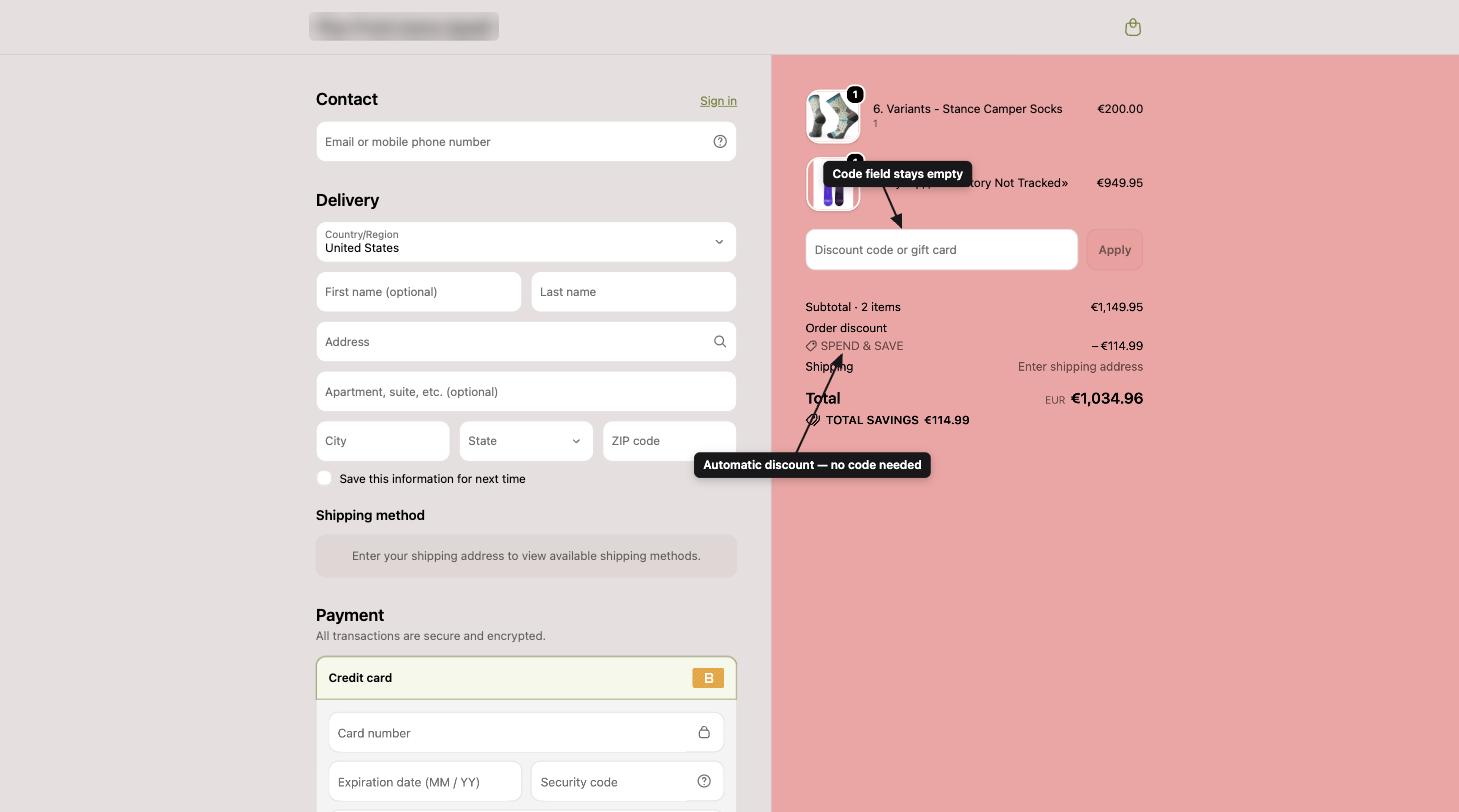
Llama Upsells gives you three ways to discount an order, each built for a different goal. They all share one thing in common: customers never type a code. Each discount applies automatically at checkout the moment the cart meets your rules.
This page is a map of the three discount types. Use the cards below to jump to the full setup guide for the one you need.
The three discount types
Offer discounts
Discount individual products inside an upsell offer — a percentage or a fixed amount, applied only to items added through that campaign.
Tier discounts
Volume pricing that rewards customers for spending more — buy more, save more, across the whole cart.
Shipping discounts
Free or reduced-cost shipping that kicks in when the cart meets your conditions.
How each one works
Offer discounts
When you build an upsell offer inside a campaign, you can attach a discount to each product in that offer. There are two types:
- Percentage — for example, 20% off.
- Fixed amount — for example, $5 off.
The discount is tied to the offer itself. It applies only to products that the customer added through that specific campaign widget — not to the same product if they add it directly from a product page. This keeps your offer pricing exactly where you intended it.
Offer discounts also respect the customer's currency. When you set an amount, the app stores it per currency, and checkout shows the right amount in the shopper's currency automatically.
Offer discounts are tied to your campaigns, so they share your campaign limit rather than counting against the discount limits below.
Tier discounts
Tier discounts reward customers who spend more — the classic "spend more, save more" promotion. You set up one or more tiers, each with a minimum cart subtotal (and an optional maximum), and the discount that applies once the cart reaches that tier. The highest qualifying tier is the one that applies.
| Cart subtotal | Discount |
|---|---|
| Under $50 | No discount |
| $50–$99 | 10% off |
| $100+ | 20% off |
You can fine-tune which products actually receive the discount:
- All eligible products — every non-excluded item in the cart.
- Highest-priced items — only the most expensive items, up to a number you choose.
- Lowest-priced items — only the least expensive items, up to a number you choose.
You can also exclude specific products — both from the subtotal calculation and from receiving the discount — by tagging them in Shopify. Tiers can apply to the whole cart or only to matching products, and you can limit eligibility by customer tag, target specific Shopify markets, and set start and end dates.
Shipping discounts
Shipping discounts give customers free or reduced-cost shipping when the cart meets your rules. Like other discounts, they use two value types:
- Percentage — takes a percent off the shipping rate. A Percentage of 100 makes shipping free.
- Fixed — takes a flat amount off the shipping rate.
You build the conditions the same way you build campaign rules — subtotal, product matching, customer tags, and so on — and you can target specific shipping methods, markets, and date ranges. Like tier discounts, shipping discounts apply automatically at checkout.
How discounts apply at checkout
All three types are created as Shopify automatic discounts behind the scenes, using Shopify's own discount system. That means:
- No codes required. The discount shows up as a discount line in the cart and at checkout the moment the conditions are met.
- They follow Shopify's combination rules. Whether an app discount can combine with a Shopify discount code or another automatic discount depends on the combination settings you choose in your Shopify admin. The app doesn't override Shopify's combination logic.
Want to require a code first?
Tier discounts can be set up two ways: automatic (apply with no code) or promo-code based (the customer must enter a code to unlock the discount). Promo codes can also be used inside campaigns as a trigger — firing a campaign only when a specific discount code is applied. That trigger is a separate concept from the discounts on this page; it gates when an offer appears rather than discounting the order itself.
Plan limits
Each subscription plan includes a set number of active tier discounts and shipping discounts. Offer discounts are tied to campaigns and share your campaign limit, so they aren't counted here.
| Plan | Tier discounts | Shipping discounts |
|---|---|---|
| Free | 1 | 1 |
| Starter | 3 | 3 |
| Growth | 6 | 6 |
| Pro | 10 | 10 |
| Enterprise | 20 | 20 |
You can see your current usage on the subscription page. If you hit a limit, disable an existing discount or upgrade your plan before creating a new one.
Hard ceilings vs plan limits
The numbers in the table above are your plan limits — how many tier and shipping discounts your current subscription lets you keep active at once. There's a second, separate set of numbers: the hard ceilings built into the app and into Shopify itself. These never change with your plan, and they cap the absolute number of discounts that can ever exist.
It's easy to assume 20 is simply "the top of the table," but 20 is doing double duty here. The Enterprise plan's allowance of 20 tier discounts and 20 shipping discounts is set to the app's hard ceiling — so on Enterprise, your plan limit and the app ceiling are the same number. On every other plan, the plan limit is the lower of the two and is what actually stops you.
| Limit | Value | What it caps | Changes with plan? |
|---|---|---|---|
| Offer (campaign) automatic discounts | No fixed app cap | Offers are packed into discount metafield nodes (split at ~9,990 characters); bounded only by the Shopify 25 below | No — no app ceiling |
| Tier discounts | 20 | The most tier discounts the app will ever create | No — fixed app ceiling |
| Shipping discounts | 20 | The most shipping discounts the app will ever create | No — fixed app ceiling |
| Shopify automatic discounts | 25 | Total automatic discounts allowed on your whole store, across all apps | No — Shopify platform limit |
The Shopify cap of 25 automatic discounts is store-wide and shared across every app you have installed — not just Llama Upsells. Tier discounts, shipping discounts, and the automatic discounts your campaigns create all consume slots from the same pool of 25, alongside any automatic discounts created by your other Shopify apps. If that pool is already full, Shopify rejects the next discount even though you're under your Llama Upsells plan limit. If creation fails unexpectedly, open Discounts in your Shopify admin and remove unused automatic discounts (from any app) to free up slots.
There is no fixed app limit on automatic offer discounts — the app packs offers into discount metafield nodes (splitting at ~9,990 characters). The only hard ceiling is Shopify's maximum of 25 automatic discounts per store. Offer discounts count toward that store-wide pool of 25 and your campaign limit — not toward the per-plan tier or shipping discount counts in the table above.
Go deeper
The pages below cover the trickier parts of discounting — what happens when discounts collide, the exact value types and how they're calculated, how the app plays with native Shopify discounts, and how to gate a discount behind a code.
Stacking, limits & conflicts
How tier, shipping, and offer discounts behave when several could apply at once, plus how the plan and ceiling limits interact in practice.
Discount value types
Percentage vs fixed amount vs free shipping — what each one does, how it's calculated, and how per-currency amounts work.
Combining with Shopify discounts
How your app discounts follow Shopify's own combination rules, and how to set them to stack with codes or other automatic discounts.
Promo codes as discounts
Turn a tier discount into a code-gated promotion, and tell it apart from using a promo code to trigger a campaign.
For details on how discounts interact with campaigns, restrictions, and the cart, see How features interact.
Scheduling campaigns by date and time
Use the date-range filter to turn a campaign on and off automatically at an exact start and end time, with no manual toggling.
Applying discounts to offer products
Add a fixed or percentage discount to the products you offer in a campaign, including 100% off for a free gift.