
How conditions (display rules) work
Learn how rule groups and AND/OR logic decide when your campaign shows its offer to a shopper.
Conditions are the display rules that decide when a campaign shows its offer. Every campaign has one or more conditions, and each condition is built from rules you combine with simple AND/OR logic. This page explains how those rules are structured and how a campaign decides whether to display.
The big picture
A campaign pairs an offer (the products you want to recommend or add to the cart) with conditions (the rules that decide when that offer shows up). When a shopper's cart matches a condition, the offer fires.
You don't need to write code. You build conditions visually by stacking rules, grouping them, and choosing whether they must all match or any match.
A rule simply compares one piece of cart data (like the subtotal, or whether a product is in the cart) to a value you set. For the full list of things a rule can check, see the Condition selectors reference.
Rules, groups, and conditions
Conditions are organized in three layers. Understanding these layers is the key to building targeting that behaves the way you expect.
A rule
The smallest building block. A single rule checks one thing — for example, "cart subtotal is greater than or equal to $50" or "a product tagged gift-eligible is in the cart."
A rule group
A set of rules joined together. Inside a group, you choose how the rules combine:
- AND — every rule in the group must match.
- OR — any one rule in the group is enough to match.
A condition
One or more rule groups joined together. The condition has its own connector that joins the groups:
- AND — every group must pass.
- OR — any one group passing is enough.
When the condition passes, the offer fires.
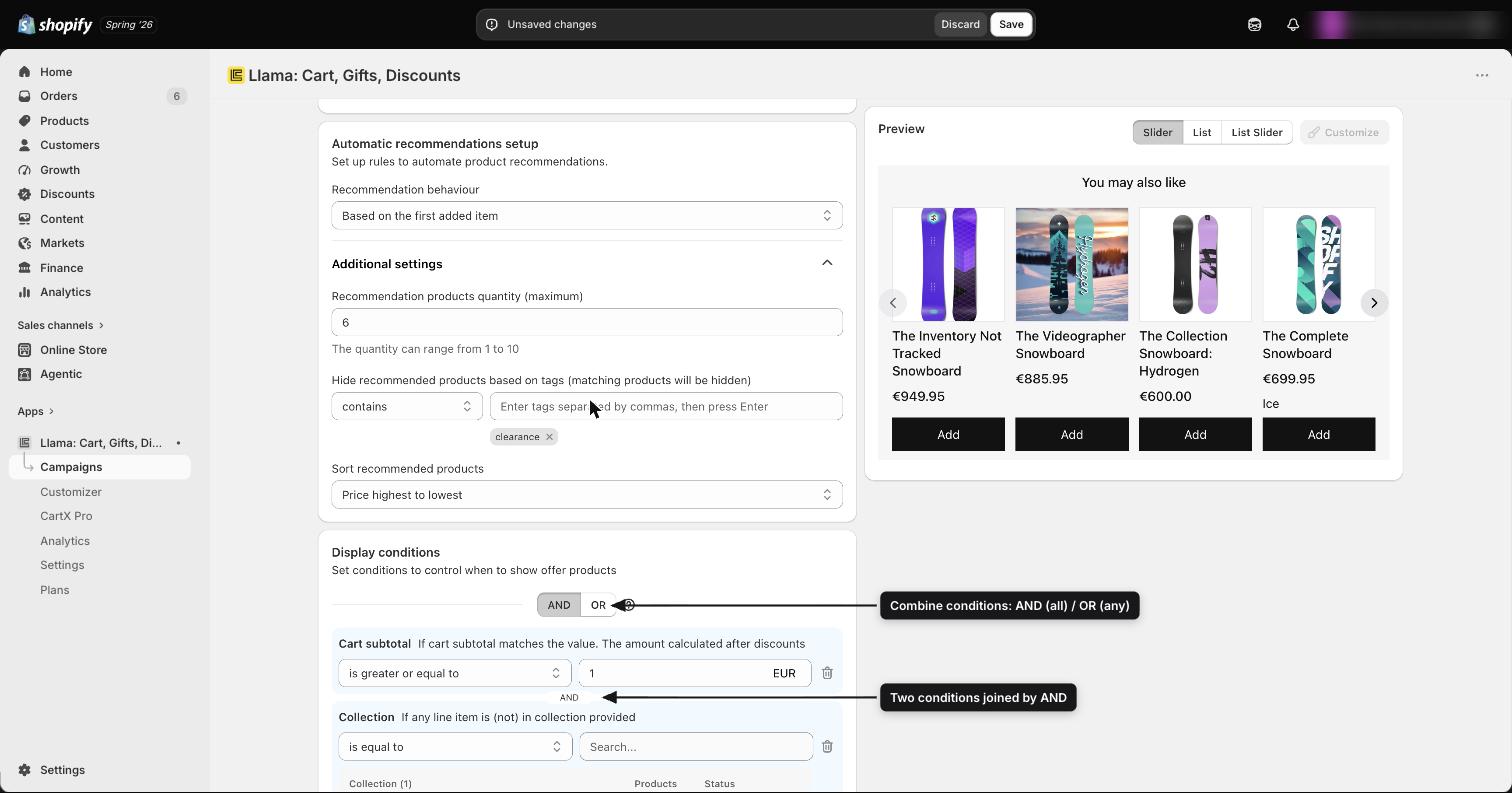
How AND and OR work at each level
This is a two-level AND/OR system. The same two words mean the same thing at both levels — they just apply to different things.
| Level | What AND means | What OR means |
|---|---|---|
| Within a rule group | All rules in the group must match | Any one rule in the group must match |
| Between rule groups | All groups must pass | Any one group must pass |
So you can build something like: "(Product A is in the cart OR Product B is in the cart) AND (the cart subtotal is at least $50)." The first set of parentheses is one group using OR; the second is another group; the AND between them is the condition's connector.
A quick way to read your own condition: rules inside the same group are checked together first, then the groups are combined using the condition's connector.
Matched products carry forward
Here is the part that makes rule groups powerful. When a rule group matches on products, the items it matched are passed forward as the input to the next group. This lets you build "filter, then measure" logic in two steps:
- Group 1 finds the products you care about — for example, everything tagged
coffee. - Group 2 then measures only those products — for example, that their combined quantity is at least 2, or their combined subtotal is over $30.
Because the second group only sees the items the first group matched, you can check the subtotal or quantity of a filtered set of products rather than the whole cart.
Example: "Find products tagged coffee AND check that their combined quantity is at least 2." The first group filters; the second group counts what's left.
How a campaign decides whether to display
When a shopper loads a page or changes their cart, the app evaluates the campaign's conditions against the live cart:
Evaluate each group
Every rule group is checked using its own AND/OR setting.
Combine the groups
The groups are combined using the condition's connector (AND or OR).
Fire the offer
If the condition passes, the offer appears (or, for an Auto-Add campaign, the product is added to the cart). If it doesn't pass, nothing shows.
Conditions always reflect the live cart
Conditions are re-checked whenever the cart changes. If a shopper adds or removes an item, a condition that wasn't matching a moment ago can start matching — and one that was matching can stop. For Auto-Add campaigns, this means an automatically added product can be removed again if the rule that triggered it is no longer true.
Multiple campaigns can fire at once
There is no "first match wins" rule for most campaign types. If several active campaigns all match the same cart, every matching campaign displays its offer.
Post-purchase campaigns are the exception. They are evaluated in a strict priority order, and only the first matching campaign is shown. If the shopper declines it, a downsell offer (if you configured one) appears before the next priority is checked.
Good to know
Next steps
Condition selectors reference
The full list of data points a rule can check — products, totals, tags, UTM, and more.
Schedules, markets & customer tags
Layer time windows and audience targeting on top of your conditions.
Promo code triggers
Fire a campaign only when a shopper has applied a specific discount code.
Campaigns
See how conditions fit into building and managing a full campaign.
Campaign statuses, limits & health warnings
What Active, Inactive, and Draft mean, how plan limits cap active campaigns, and how to fix the red health warnings.
Condition selectors reference
A complete reference of every condition rule available in Llama Upsell campaigns, grouped by category with matchers and value types.