
Plans & billing
Overview of Llama Upsell plans, monthly fees, per-order fees, and usage caps, with links to the full billing guides.
Llama Upsell uses a tiered subscription model. Your plan sets how many campaigns, discounts, restrictions, and limiters you can run at the same time, and it determines the per-order fee you pay on the orders your offers help create. This page is the hub for billing: it summarizes the plans and the two parts of your bill, then links out to the detailed guides for plan limits, overflow billing, trials, and reinstall behavior.
Subscription plans
There is a free tier plus four paid plans. Each step up raises your feature limits, raises your included monthly orders, and lowers your per-order fee.
| Plan | Price | Included orders/mo | Per-order fee | Monthly cap |
|---|---|---|---|---|
| Free | $0 | 50 | $0 | none |
| Starter | $9.99/mo | 500 | $0.02 | $100 |
| Growth | $19.99/mo | 2,000 | $0.015 | $200 |
| Pro | $99.99/mo | 2,000 | $0.01 | $500 |
| Enterprise | $299.99/mo | 25,000 | $0.005 | $1,000 |
Every new installation includes a 7-day free trial, so you can set up campaigns and try the app before any charges begin. See Free trial & subscription status.
For the full side-by-side comparison — including the feature limits for campaigns, cart restrictions, product limiters, tier discounts, and shipping discounts — see Plan comparison & limits. You can also review every plan and compare your current usage against the limits on the subscription page inside the app.
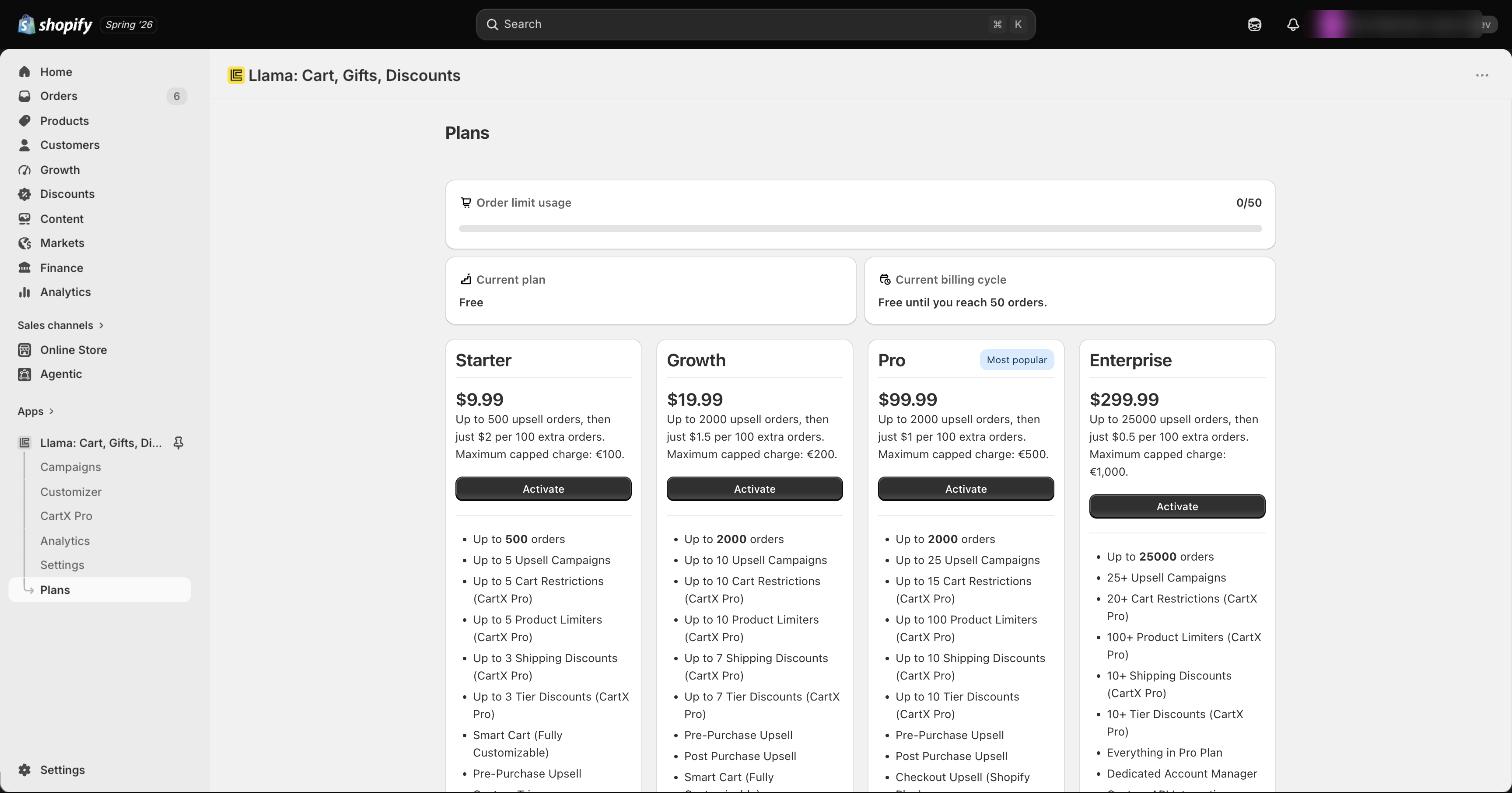
The numbers above are the production values you'll see on a live store. The in-app subscription page is always the source of truth for your current plan, usage, and what you'll be charged.
How billing works
Billing runs through Shopify's billing system, so your Llama Upsell charges appear on your regular Shopify invoice — there is no separate payment method to set up.
There are two parts to what you pay on a paid plan:
- Monthly plan fee — the recurring price shown in the table above, billed on a monthly cycle.
- Per-order fee — a small fee on the orders beyond your plan's included monthly orders. This is how overflow usage is billed above the flat monthly price.
The Free plan has no monthly fee and no per-order fee. All charges — monthly fees and per-order fees alike — are collected through Shopify.
Per-order fee by plan
Each paid plan includes a set number of orders per month at no extra cost. Once you pass that included count, every additional order is charged the plan's per-order fee. The fee gets smaller on higher tiers:
| Plan | Per-order fee |
|---|---|
| Free | $0 |
| Starter | $0.02 |
| Growth | $0.015 |
| Pro | $0.01 |
| Enterprise | $0.005 |
Because the per-order fee shrinks on higher tiers, the right plan for you depends on your order volume, not just on how many campaigns you want to run. If your per-order fees are adding up, compare them against the savings a higher plan's lower fee would give you.
Monthly usage cap
Per-order fees can't run away from you. Each paid plan has a monthly usage cap — the most you can be charged in per-order (overflow) fees in a single billing cycle, on top of the flat monthly fee:
| Plan | Monthly cap |
|---|---|
| Starter | $100 |
| Growth | $200 |
| Pro | $500 |
| Enterprise | $1,000 |
Once you reach the cap for the cycle, overflow charges stop accruing until the next cycle resets. The Free plan has no cap because it has no per-order fee.
For a worked example of how included orders, per-order fees, and the cap interact across a billing cycle, see Order limits & overflow billing.
Plan limits and how they're enforced
Plan limits are enforced automatically, and they only ever count items that are active:
- Inactive campaigns, restrictions, and limiters do not count toward your limits.
- If you try to activate an item that would put you over your plan's limit, it is saved as inactive instead, and you'll see a notification in the app explaining why.
This means you never lose work by hitting a limit — the item is kept, just switched off until you make room or upgrade.
If a campaign or discount you expected to be live isn't showing, check whether you've hit your plan limit. Switch off another active item or upgrade your plan, then activate the one you want.
The exact cap for each feature on each plan is in Plan comparison & limits.
Changing your plan
When you upgrade, the new, higher limits take effect immediately — anything that was switched off because of the old limits can be turned back on right away. When you downgrade, items over the new limit are handled automatically, but the details differ by feature: campaigns are deactivated newest-first, while cart restrictions and product limiters are left for you to trim yourself.
For the full step-by-step procedure, the newest-first deactivation behavior, and the edge cases to watch for, see Upgrading & downgrading.
Deactivated campaigns are never deleted. If you upgrade again later, you can simply reactivate them.
Subscription status
Your subscription page shows a status that tells you the state of your plan at a glance:
| Status | What it means |
|---|---|
| Active | Your plan is paid and all features are available. |
| Limit reached | You've hit a plan usage limit; some features may be restricted until you make room or upgrade. |
| Cancelled | The subscription is cancelled and features are no longer served on your storefront. |
For how each status is reached, how the trial transitions into a paid status, and what happens to your data when you uninstall, see Free trial & subscription status and Install, reinstall & data retention.
Related guides
Plan comparison & limits
Full side-by-side feature limits for every plan, plan by plan.
Order limits & overflow billing
How included orders, per-order fees, and the monthly cap combine across a cycle.
Upgrading & downgrading
Step-by-step plan changes, newest-first deactivation, and edge cases.
Free trial & subscription status
The 7-day trial and what Active, Limit reached, and Cancelled mean.
Install, reinstall & data retention
What happens to your subscription and data when you uninstall and reinstall.
App settings
Configure cart integration, global widget styles, and checkout messages.
App settings
The app's Settings page and what each section controls, including global price formatting, a store-wide error message, and a global CSS editor.
Free trial & subscription status
Understand the 7-day free trial, the billing lifecycle, and every subscription status you can see in Llama Upsell.