
Order limits & overflow billing
Exactly what counts as a billable order, how your monthly allotment works, how per-order overflow fees are charged, and the monthly cap.
Llama Upsell does not bill you for every order in your store. It only counts orders that one of your offers actually helped create — and only those count toward your monthly allotment or trigger any per-order fee. This page is the definitive explanation of what counts as a billable order, how your included orders reset each cycle, when overflow fees kick in, and how the monthly spending cap protects you.
What counts as an order
The single most important rule: only an order that contains at least one product attributed to a Llama campaign is counted. A normal order with no upsell or cross-sell line item is not counted and is never billed.
So if a customer buys only items they would have bought anyway — with no product added by one of your offers — that order does not increase your count and you pay nothing extra for it, no matter how large the order is.
How an order gets attributed
Attribution happens in one of two ways, depending on where the offer ran. Each one increments your shop's order count by exactly 1 per order — never more, even if several offers contributed to the same order.
| Offer type | How it's stamped | When it's counted |
|---|---|---|
| Storefront upsells (Llama Cart, pre-purchase, in-cart offers) | A hidden line item property _<appName> is added to the upsell line item, carrying the campaign ID as its value. | When the order is placed (ORDERS_CREATE). |
| Post-purchase upsells (offers shown after checkout) | A campaignId order metafield is written to the order. | When the order is edited to add the product (ORDERS_EDITED). |
In both cases, the system reads the campaign reference, confirms a campaign-attributed product is present, and adds 1 to your order count for that order.
If an order has no Llama line item property and no campaign metafield, the app skips it entirely — it is never stored and never counted. Your Llama order count is therefore almost always lower than your total Shopify order count.
Your monthly included orders
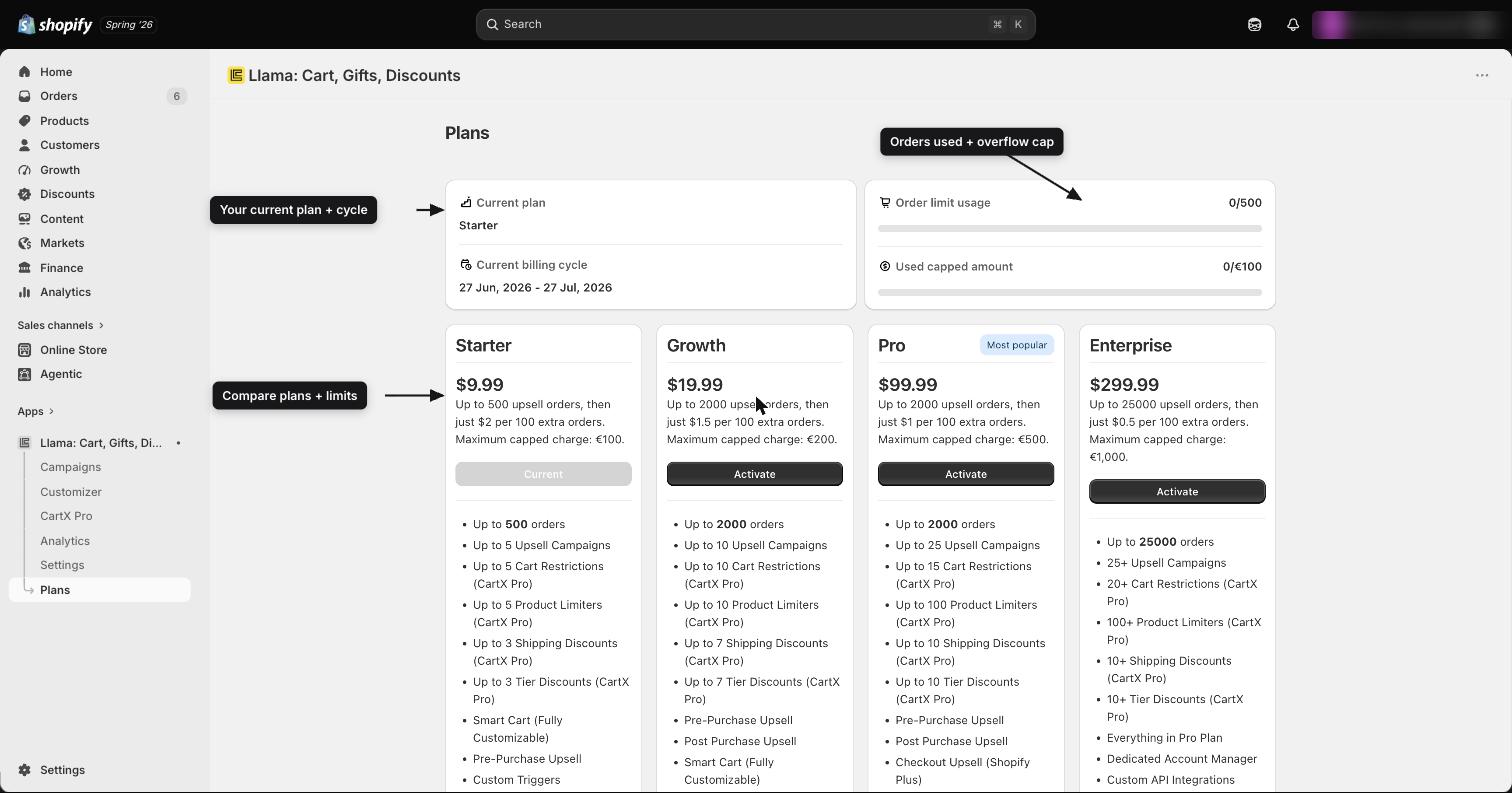
Every plan comes with a number of included orders per billing cycle. As long as your attributed orders stay at or below this allotment, you pay only your flat monthly plan fee — no per-order fees at all.
| Plan | Monthly included orders |
|---|---|
| Free | 50 |
| Starter | 500 |
| Growth | 2,000 |
| Pro | 2,000 |
| Enterprise | 25,000 |
These allotments reset at the start of each billing cycle. The reset is anchored to your last billing date, so your counter returns to zero when a new cycle begins and you get the full allotment again.
Where to see your usage
On the subscription page inside the app, your usage is shown as a current count against your plan's maximum:
currentOrdersvsmaxOrders— your recurring subscription's attributed-order count for this cycle versus your plan's included allotment. This is the number to watch: whencurrentOrderspassesmaxOrders, overflow billing begins.usageSubscription.orders— the order count tracked on the usage side of your subscription, used to calculate any per-order charges.
What triggers overflow
Once your attributed orders exceed the included allotment in a cycle, each additional attributed order incurs your plan's per-order fee. Orders inside the allotment are always free; only the ones beyond it are charged.
| Plan | Per-order fee (overflow) |
|---|---|
| Free | $0 |
| Starter | $0.02 |
| Growth | $0.015 |
| Pro | $0.01 |
| Enterprise | $0.005 |
The Free plan's per-order fee is $0, so the Free plan never overflow-bills. You can exceed 50 attributed orders on Free without incurring per-order charges — the allotment just marks where usage is tracked.
The per-order fee gets smaller on higher plans. If your overflow fees are adding up, it can be cheaper to move up a tier: the higher plan's larger allotment plus its lower per-order fee may cost less overall than staying put.
Worked example
A store on the Growth plan gets 2,000 included orders per cycle.
Suppose this cycle generates 2,150 attributed orders:
- The first 2,000 are covered by the included allotment — $0 in per-order fees.
- The remaining 150 are overflow, billed at the Growth per-order fee of $0.015 each.
- Overflow charge:
150 × $0.015 = $2.25, added as usage charges on top of the $19.99 monthly fee.
So that cycle's total would be $19.99 + $2.25 = $22.24.
The monthly cap
Per-order (usage) charges can never run away on you, because Shopify enforces a monthly capped amount per plan. This is the maximum total in usage charges the app can bill you in a single cycle.
| Plan | Monthly capped amount |
|---|---|
| Starter | $100 |
| Growth | $200 |
| Pro | $500 |
| Enterprise | $1,000 |
As overflow orders accrue, their fees add up (withdrawAmount) toward your plan's cappedAmount. The cap covers only usage (per-order) charges — your flat monthly plan fee is separate and is not counted against the cap.
When usage charges reach the cap, Shopify pauses further usage charges for the rest of the cycle. Your offers keep running and orders keep being counted, but no additional per-order fees are billed until you approve a higher capped amount. If you expect heavy volume, raise your cap proactively so billing isn't interrupted.
How charges appear
There is no separate card or invoice for Llama Upsell. Both parts of your bill — the recurring monthly plan fee and any usage (per-order) charges — flow through Shopify's billing system via the Mantle billing integration, and land on your regular Shopify invoice.
That means you manage and pay for the app exactly the way you pay for Shopify itself, and you can review the recurring charge and the usage charge as line items on your Shopify bill.
Edit, refund & duplicate behavior
A few edge cases affect how orders are counted. Read these before you try to reconcile your Llama count against Shopify.
An edit to an already-tracked order can still add to your count. When a post-purchase product is added to an existing order, the ORDERS_EDITED event increments the count by 1 — even if that same order was already counted at checkout. An order that gets both a storefront upsell and a post-purchase upsell can therefore be counted more than once.
Cancelled and refunded orders are not automatically decremented. Once an attributed order has been counted, cancelling or refunding it later does not remove it from your cycle count. The count reflects orders your offers influenced at the time they were placed.
Orders are deduplicated at the document level by Shopify order ID — the same order ID is stored as a single order document rather than duplicated. This keeps your stored order list clean even when the same order is delivered or processed more than once.
Estimate your monthly cost
Use this simple recipe to estimate what you'll pay in a cycle:
estimated cost = monthly fee
               + max(0, attributedOrders − includedOrders) × perOrderFee

…then cap the per-order portion at the plan's cappedAmount.
Count your attributed orders
Estimate how many orders this cycle will contain at least one product added by a Llama offer. Remember: orders with no upsell line item don't count.
Subtract your included allotment
Subtract your plan's included orders. If the result is zero or negative, you owe only the flat monthly fee — no per-order charges.
Multiply the overflow by your per-order fee
Take the overflow count (orders beyond the allotment) and multiply by your plan's per-order fee.
Apply the cap, then add the monthly fee
If the per-order total would exceed your plan's capped amount, it stops at the cap. Add the flat monthly plan fee to get your estimated total.
Example (Pro plan): 2,600 attributed orders, 2,000 included → 600 overflow × $0.01 = $6.00 in usage charges (well under the $500 cap). Total estimate: $99.99 + $6.00 = $105.99.
FAQ
Related guides
Plan comparison: limits, prices & per-order fees
A complete side-by-side reference for the current Llama Upsell plans — prices, included orders, per-order fees, usage caps, and every feature limit.
Legacy plans & pricing versions
If you're on an older Llama Upsell plan, understand what you have, how it differs from current pricing, and whether to move.