
Plan comparison: limits, prices & per-order fees
A complete side-by-side reference for the current Llama Upsell plans — prices, included orders, per-order fees, usage caps, and every feature limit.
This is the deep reference for the current Llama Upsell plans. Use it when you need the exact numbers behind every plan — not just the headline price, but included orders, per-order fees, usage caps, and the limit on each gated resource. For a friendlier overview of how billing works (trials, upgrades, downgrades, and how charges appear on your Shopify invoice), see Plans & billing.
The current plans
There are five self-serve plans today: Free, Starter, Growth, Pro, and Enterprise. There is also a sixth, hidden Custom plan that is only set up for negotiated deals — it never appears in the in-app plan picker and you cannot subscribe to it yourself.
All five self-serve plans belong to what the app calls active pricing version 4 — the pricing structure introduced in October 2024. Every plan shown on your in-app subscription page is a version 4 plan.
If your store subscribed before October 2024, you may be on an older pricing version (a v1, v2, or v3 plan such as Lite or Pro+). Those legacy plans have different prices, different included-order allotments, and different per-order fees than the v4 numbers on this page. Your in-app subscription page always shows the figures that apply to your plan — treat it as the source of truth.
Master comparison table
Every documented value for the current (v4) plans, one row per plan. Monetary values are in USD; the per-order fee is charged on each order beyond your included monthly allotment.
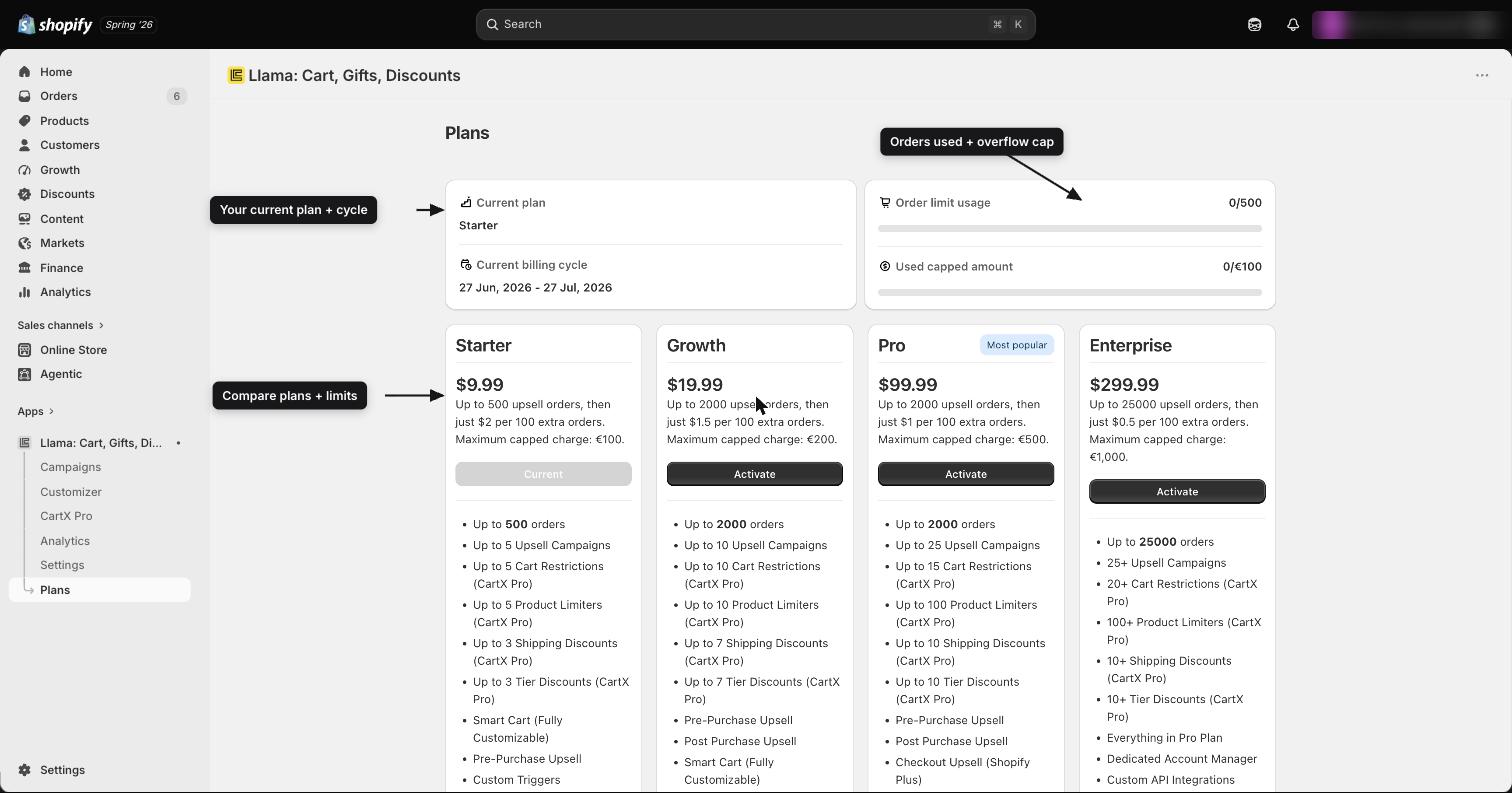
| Plan | Monthly price | Included orders / mo | Per-order overflow fee | Monthly usage cap | Active campaigns | Cart restrictions | Product limiters | Shipping discounts | Tier discounts |
|---|---|---|---|---|---|---|---|---|---|
| Free | $0 | 50 | $0 | $0 | 1 | 1 | 1 | 1 | 1 |
| Starter | $9.99 | 500 | $0.02 | $100 | 5 | 5 | 5 | 3 | 3 |
| Growth | $19.99 | 2,000 | $0.015 | $200 | 10 | 10 | 10 | 6 | 6 |
| Pro | $99.99 | 2,000 | $0.01 | $500 | 25 | 15 | 100 | 10 | 10 |
| Enterprise | $299.99 | 25,000 | $0.005 | $1,000 | Unlimited | 20 | Unlimited | 20 | 20 |
| Custom | ~$500 | Effectively unlimited | $0 | — | Unlimited | 20 | Unlimited | 20 | 20 |
A few things to read carefully in this table:
- Included orders is the number of orders covered by your flat monthly price. Once you exceed it, each additional order is billed at the per-order overflow fee for your plan.
- The monthly usage cap (also called the capped amount) is the maximum total of per-order fees that can be billed in a single billing cycle, on top of your monthly price. Once you reach the cap, no further per-order fees are charged for that cycle. Free has a $0 cap because it has no per-order fee at all.
- Custom is effectively unlimited on orders (it carries a very large allotment) and charges no per-order fee. It is not self-serve.
"Unlimited" is literal. For Enterprise and Custom, Active campaigns and Product limiters are genuinely uncapped — internally the limit is set to infinity, so there is no number you can hit. But the finite limits on those same plans (cart restrictions, shipping discounts, and tier discounts all cap at 20) still apply. Being on an "unlimited" plan does not make every resource unlimited.
Per-feature deep dives
Five resources are gated by your plan: campaigns, cart restrictions, product limiters, shipping discounts, and tier discounts. Two rules apply to all of them.
Only active items count. Inactive and draft items never count toward a limit. You can keep as many switched-off campaigns, restrictions, limiters, and discounts saved as you like — only the ones currently active consume your allowance. This means you never lose work by hitting a limit; the item is simply saved in the off state until you make room or upgrade.
Where you see usage vs. limit. Each feature's list page shows how many active items you have against your plan's cap, and the in-app subscription page summarizes your usage across all five resources. When you try to activate an item that would push you over the cap, the app saves it as inactive and shows a notification explaining why.
What counts: every campaign with a status of active — across all funnel types (pre-purchase, post-purchase, gift with purchase, auto-add, checkout, and so on). Draft and inactive campaigns do not count.
Limits by plan: Free 1, Starter 5, Growth 10, Pro 25, Enterprise Unlimited, Custom Unlimited.
At the cap: if you try to activate a campaign that would exceed your limit, it is force-saved as inactive and you get a "limit reached" notification. The same enforcement runs when you create a campaign and when you switch an inactive one back on.
What counts: active cart restriction rules (the rules that block or warn customers at checkout). Inactive restrictions do not count.
Limits by plan: Free 1, Starter 5, Growth 10, Pro 15, Enterprise 20, Custom 20.
At the cap: activating a restriction beyond the limit keeps it saved but inactive. Note that cart restrictions are not auto-deactivated when you downgrade — only campaigns are. If you drop to a plan with fewer restriction slots, you'll need to switch off the extras yourself.
What counts: active product limiters (per-product or per-variant quantity caps). Inactive limiters do not count.
Limits by plan: Free 1, Starter 5, Growth 10, Pro 100, Enterprise Unlimited, Custom Unlimited.
At the cap: a limiter that would exceed the cap is saved as inactive. Like restrictions, product limiters are not auto-deactivated on a downgrade — disable extras manually if you drop below your current usage.
What counts: active shipping discounts (free or reduced-rate shipping offers). Inactive ones do not count.
Limits by plan: Free 1, Starter 3, Growth 6, Pro 10, Enterprise 20, Custom 20.
At the cap: a shipping discount over the limit is saved inactive until you make room.
What counts: active tier discounts (buy-more-save-more ladders). Inactive ones do not count.
Limits by plan: Free 1, Starter 3, Growth 6, Pro 10, Enterprise 20, Custom 20.
At the cap: a tier discount over the limit is saved inactive until you make room.
The Pro and Enterprise asymmetry
The limits do not scale uniformly across resources, which surprises some merchants:
On Pro, you get 100 product limiters but only 15 cart restrictions — far fewer restrictions than limiters. If you build heavily on checkout restrictions, Pro may feel tighter than its 100-limiter headline suggests.
On Enterprise, campaigns and product limiters are unlimited, but cart restrictions, shipping discounts, and tier discounts are all still capped at 20. The "unlimited" tier is not unlimited on every axis.
| Resource | Free | Starter | Growth | Pro | Enterprise |
|---|---|---|---|---|---|
| Active campaigns | 1 | 5 | 10 | 25 | Unlimited |
| Cart restrictions | 1 | 5 | 10 | 15 | 20 |
| Product limiters | 1 | 5 | 10 | 100 | Unlimited |
| Shipping discounts | 1 | 3 | 6 | 10 | 20 |
| Tier discounts | 1 | 3 | 6 | 10 | 20 |
Feature-availability matrix
Beyond the numeric limits, certain capabilities only unlock at higher tiers. This table shows the first plan at which each capability becomes available.
| Capability | Free | Starter | Growth | Pro | Enterprise |
|---|---|---|---|---|---|
| Smart Cart (fully customizable) | ✓ | ✓ | ✓ | ✓ | ✓ |
| Pre-Purchase Upsell | ✓ | ✓ | ✓ | ✓ | ✓ |
| Custom Triggers | ✓ | ✓ | ✓ | ✓ | ✓ |
| Manual Product Recommendations | ✓ | ✓ | ✓ | ✓ | ✓ |
| Mobile-Optimized Upsell Offers | ✓ | ✓ | ✓ | ✓ | ✓ |
| Basic Analytics | ✓ | ✓ | ✓ | ✓ | ✓ |
| Email support | ✓ | ✓ | ✓ | ✓ | ✓ |
| Post-Purchase Upsell | — | — | ✓ | ✓ | ✓ |
| Multi-Step Upsell Flows | — | — | ✓ | ✓ | ✓ |
| Advanced Analytics | — | — | ✓ | ✓ | ✓ |
| Live Chat support | — | — | ✓ | ✓ | ✓ |
| Checkout Upsell (Shopify Plus) | — | — | — | ✓ | ✓ |
| Design Customization | — | — | — | ✓ | ✓ |
| Dedicated Account Manager | — | — | — | — | ✓ |
| Custom API Integrations | — | — | — | — | ✓ |
| Personalized Onboarding & Training | — | — | — | — | ✓ |
| SLA-Backed Priority Support | — | — | — | — | ✓ |
Reading the matrix:
- Free already includes the core toolkit: Smart Cart, Pre-Purchase Upsell, custom triggers, manual recommendations, mobile-optimized offers, basic analytics, and email support.
- Growth is where Post-Purchase Upsell, Multi-Step Upsell Flows, and Advanced Analytics first appear (Starter still tops out at the Free capability set, just with higher numeric limits).
- Pro adds Checkout Upsell (Shopify Plus) and Design Customization.
- Enterprise layers on the white-glove services: a Dedicated Account Manager, Custom API Integrations, personalized onboarding, and SLA-backed priority support — on top of everything in Pro.
How to choose a plan
The single biggest driver of plan choice is usually order volume, not how many campaigns you want to run. Tie three numbers together: your expected monthly upsell orders, the included-order allotment, and the per-order overflow fee.
Estimate your monthly upsell order volume
Look at how many orders your offers are likely to help create per month. That number — not your campaign count — is what most often determines which plan is cheapest overall.
Match it to an included-order allotment
Find the lowest plan whose included orders comfortably cover your volume. For example, a store doing 1,500 upsell orders a month fits inside Growth (2,000 included). At that volume you pay just the $19.99 monthly price — overflow only kicks in above 2,000 orders, so there is $0 in per-order fees.
Weigh overflow against the next tier up
If you regularly exceed your allotment, compare the overflow fees against upgrading. The per-order fee drops on every higher tier ($0.02 → $0.015 → $0.01 → $0.005), and the monthly usage cap rises ($100 → $200 → $500 → $1,000), so a higher plan's lower fee can offset its higher monthly price once volume is high enough.
Only then check the feature limits
Confirm the plan you've picked on volume also covers the number of active campaigns, restrictions, limiters, and discounts you need — and any gated capability (Post-Purchase, Checkout Upsell, Design Customization) you rely on. If volume points one way and a needed capability points higher, the capability wins.
Worked example. A store running 6 active campaigns and 1,500 upsell orders a month is well served by Growth: $19.99/mo, 10 campaign slots (only 6 used), 2,000 included orders (no overflow), and Post-Purchase plus Advanced Analytics unlocked. Volume, not campaign count, made Growth the right call here.
Notes & caveats
These numbers reflect production stores. Development and preview stores receive much smaller order allotments than the figures in the master table (often just a handful of orders) so that billing flows can be tested without real volume. A development store showing tiny order limits is expected — those numbers are not what a live store gets.
The in-app subscription page is the source of truth. Exact prices, allotments, and limits can change, and your store may be on a legacy pricing version with different numbers. Always confirm against your live subscription page in the app rather than relying solely on this reference.
Related guides
Plans & billing
How trials, upgrades, downgrades, and per-order fees work end to end.
App settings
Configure cart integration, global widget styles, and checkout messages.
Cart restrictions
Block or warn customers when specific cart combinations occur.
Product limiter
Cap how many of a product or variant a shopper can add to their cart.
Upgrading & downgrading your plan
A step-by-step guide to changing your Llama Upsell plan and every side effect — limits, fees, auto-deactivation, and storefront sync.
Order limits & overflow billing
Exactly what counts as a billable order, how your monthly allotment works, how per-order overflow fees are charged, and the monthly cap.