
Discount not applying at checkout
Why a discount might not show up at checkout and how to fix it — stacking limits, unmet conditions, and Shopify discount conflicts.
If a discount you set up isn't showing up in the cart or at checkout, it's almost always one of a few things: the cart hasn't met the discount's conditions, you've hit a plan or Shopify discount limit, or another discount is blocking it from combining. This page walks through each cause and how to fix it.
Llama Upsells discounts are automatic discounts — the shopper never enters a code. The discounted price should appear in the cart and carry through to checkout as soon as the cart qualifies. If it doesn't, work through the checks below in order.
Start here: confirm the basics
Before digging into stacking or conflicts, rule out the most common causes.
Check that the discount is active
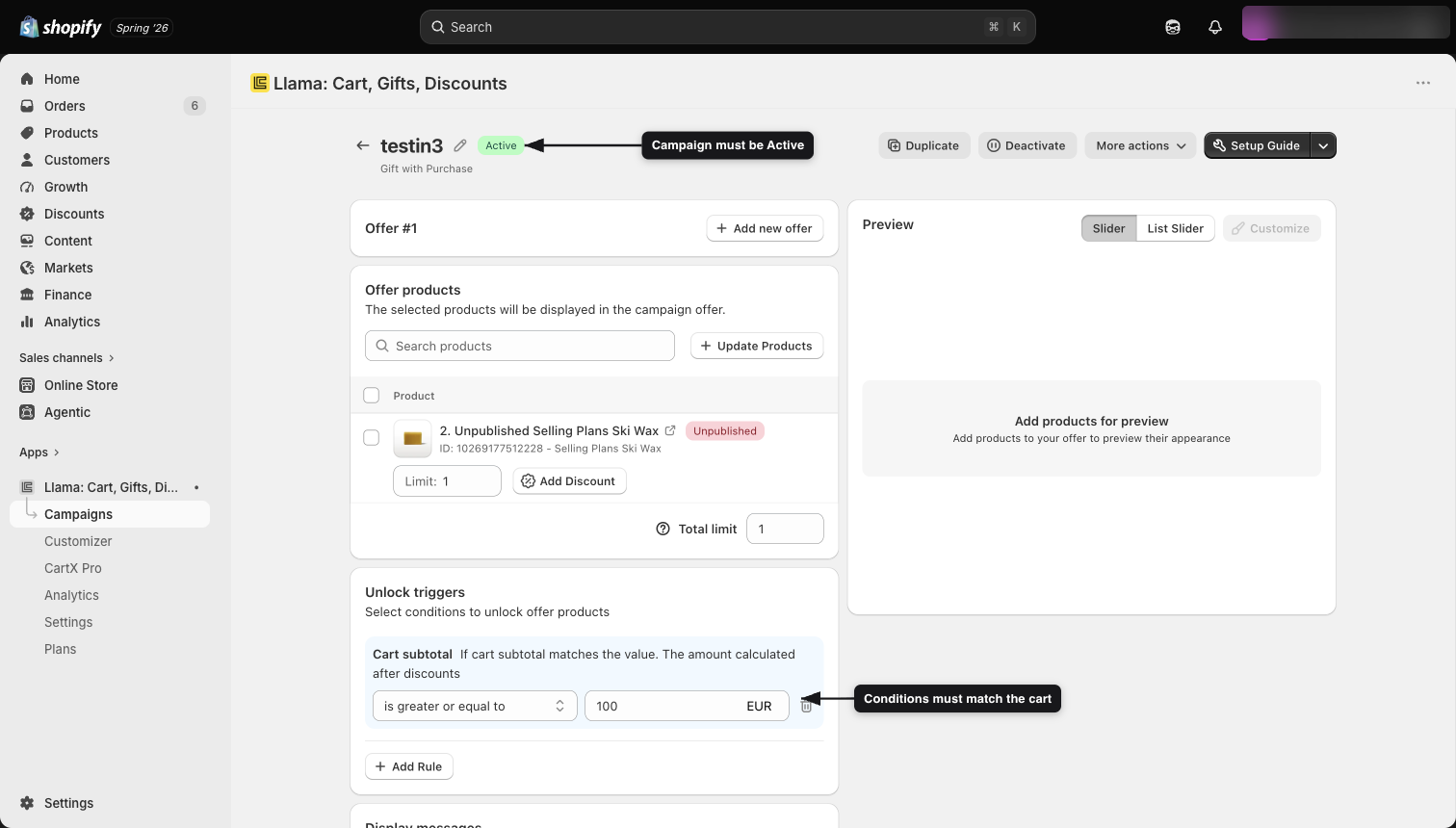
In your admin, open the discount (or the campaign it's attached to) and confirm its status. Tier and shipping discounts are either Active or Inactive — an Inactive discount won't apply to any order. The automatic discount behind a campaign offer can also show as Scheduled (its start date hasn't arrived yet) or Expired (its date window has ended); it only applies while it's Active. Re-enable or recreate it if needed.
Make sure the cart meets the conditions
Every discount only applies when its conditions are satisfied by the live cart:
- Campaign discounts apply only to products added through that campaign's offer widget — not to the same product added from a product page or collection.
- Tier discounts apply only when the cart subtotal reaches the tier's minimum (and stays within any maximum cap you set).
- Shipping discounts apply only when the cart matches the conditions you configured.
Add the qualifying products through the offer widget and confirm the subtotal clears the threshold.
The subtotal thresholds you set on tier and shipping discounts are defined in your store's base currency and converted to the shopper's presentment currency at checkout. So an international cart's effective threshold isn't the number you typed — a "$50" tier minimum becomes whatever 50 base-currency units convert to in the shopper's currency. If a discount fires (or fails to fire) at a surprising amount for overseas shoppers, the cart almost certainly sits just on the other side of the converted threshold. See Multi-currency & markets gotchas for exactly how the conversion works.
Give the rules a moment to sync, then force a refresh
When you change a discount or campaign in the admin, the app pushes the new rules to Shopify metafields that the checkout reads. This sync is nearly instant but it's asynchronous — for a brief window the old rules can still be live on the storefront.
If a recent change isn't reflected at checkout, use the Sync action on the campaign to force a metafield refresh, then test again.
Cause: you've hit a discount limit
Discounts can silently stop applying once you reach a limit — either the app's plan limit or Shopify's store-wide cap.
Plan limits
Each subscription plan includes a limit on the number of active discounts. Tier and shipping discounts are capped per plan:
| Plan | Tier discounts | Shipping discounts |
|---|---|---|
| Free | 1 | 1 |
| Starter | 3 | 3 |
| Growth | 6 | 6 |
| Pro | 10 | 10 |
| Enterprise | 20 | 20 |
Automatic product discounts tied to a campaign share the campaign limit and aren't counted separately. You can see your current usage on the subscription page.
If you've reached a plan limit, you won't be able to create new discounts until you disable an existing one or upgrade your plan. Review your active campaigns and discounts and turn off any you no longer need.
Shopify's store-wide limit
Shopify also enforces its own cap on automatic discounts across all of your apps. If your store is already at that cap, a new Llama Upsells discount may not activate. Remove unused automatic discounts in your Shopify admin to free up room.
The metafield payload is full
There's a third, easy-to-miss reason a brand-new discount or campaign can silently fail to appear — separate from the plan limit and Shopify's store-wide cap above. Your rules are written into a Shopify metafield that the checkout reads, and that metafield is capped at 10,000 characters. Campaign rules don't auto-split when they overflow, so once the metafield is full, the next campaign you add can be saved in the admin yet never make it into the payload the checkout actually evaluates — and its discount won't apply.
If you created the discount or campaign without hitting any plan or Shopify error, it's marked Active, but it still never applies, check your metafield usage. When the payload is at or near capacity, newly added rules are dropped from the checkout copy without an obvious failure. Trim or consolidate existing campaigns to free up space. See Metafield size limits & many active campaigns for the warning banner and how each feature behaves at the limit.
Cause: a Shopify discount conflict (stacking)
The most common reason a discount "disappears" when another one is present is discount combination rules.
Llama Upsells discounts are created as standard Shopify automatic discounts. They participate in Shopify's normal discount combination rules — and the app does not override that logic. Whether two discounts actually stack on a given order depends on the combination settings of each discount involved.
- App automatic product discounts are configured to combine with order, product, and shipping discounts — including discount codes a shopper enters.
- But stacking only happens if the other discount also allows the combination. If a shopper's discount code is set to not combine with other discounts, Shopify will apply one and drop the other.
If a discount stops applying only when a customer also has a Shopify discount code (or another automatic discount) on the cart, this is a combination conflict — not a bug in the app. Check the combinations settings on the conflicting Shopify discount in your Shopify admin.
How Llama Upsells discounts interact with each other
These run independently and can all apply to the same order — so one of them not showing isn't caused by the others:
- A shopper can qualify for a tier discount on the overall cart while also getting a campaign discount on an offered product. Both apply.
- A shopper who qualifies for free shipping still receives any applicable campaign and tier discounts.
If you expected two of these together and only one shows, re-check that the missing one's own conditions are met (subtotal, eligible products, customer tag, market, date range).
Cause: a cart restriction or limiter is blocking checkout
A discount can be applying correctly, but the shopper still can't complete the order because another rule blocks checkout.
- Cart restrictions are checked at checkout, not when a campaign fires. A shopper who qualifies for an offer may still be blocked at checkout if a restriction's rules match. Restrictions take precedence — if one blocks checkout, the order can't be completed regardless of any active discount.
- Product limiters are enforced at checkout too. If the cart holds more than the allowed quantity of a limited product, checkout is blocked with the limiter's error message.
If a shopper reports they "can't check out with the discount," confirm a cart restriction or product limiter isn't the real blocker. Note that restrictions and limiters do not change how the discount itself is calculated.
Still not applying? Quick checklist
Where to go next
Applying discounts to offer products
How automatic offer discounts are set up and how they apply.
Tier discounts
Volume-based pricing and the conditions that trigger it.
Shipping discounts
Free or reduced shipping and when it applies.
Cart restrictions
Rules that can block checkout independently of discounts.
Why changes take time to appear
Why a saved change can still show the old version, and how to force a refresh.
Multi-currency & markets gotchas
How subtotal thresholds convert into each shopper's currency.
Metafield size limits & many active campaigns
Why a new campaign or discount can silently fail once the payload is full.
A gift product isn't showing in the GWP widget
The Gift with Purchase widget renders, but one specific gift product is missing or the gift list looks short — find the filter or status hiding it.
Restriction or limiter isn't blocking
Why a cart restriction or product limiter doesn't enforce — or fires when it shouldn't — and how to fix each cause.